
Category Archives: Uncategorized

How to manage 100s of emails a day without going mad

21579892786_e3d206d567_zIf you are like me, you get hundreds of emails each day and more often than not you think that you would be more productive at work without the most frequently used communication method these days. Over the years I have tuned my processes and have adopted them with functionality becoming available in Outlook (my mail client of choice). I want to share my system with the rest of the world as it works reasonably well for me and perhaps can benefit others as well.

  1. Turn off notifications

The most important thing about emails is that they should not distract from any work you are doing. So do yourself a favor and go into outlook and turn off the notifications – and I mean all notifications: The sound, the little pop-up and the tray notifications. Any of those will cause you to get curious and quickly check the email and you will be immediately distracted. Same counts for your phone, set the phone to fetch and not push, so that your phone is not alerting you to new emails constantly by vibrating in your pocket or worse making a noise. On a regular basis when you have a break between other tasks you can check on your emails and you should put regular times in your calendar to go through your emails in one batch.

  1. Use Rules to direct the traffic

The inflow of traffic in your inbox can be overwhelming, especially if you get notifications from automated systems (like production monitoring). So the next important step in my system is to setup rules that automatically direct emails into different folders. I have setup a whole long list of rules, but a few core rules are the following: Emails that you are CC’d on (because they are of lower priority), Emails from your boss(es) (because they are of higher priority), Newsletters (of lowest priority), emails from family (highest priority), system generated notifications (for reference only usually), meeting invites and responses. For each of these folders you can change the setting to see how many items are in the folder which gives you a good view of the unprocessed emails in each.

  1. Filing system

Create a filing system that makes it easy to do two things: Identify your work baskets (the emails you need to do something with) and to find emails again later (some do this in one big reference folder, others prefer a more sophisticated folder structure). I will not talk about the reference folders as personal preference prevails for those, but want to share my work baskets with you. For each folder I have set it so that I see how many items are in the folder, not just the ones marked new as each item in these folders represents a backlog item whether I have seen the email or not.

  • Unprocessed emails (which the rules from step 2 above sort for me)
    • Inbox (everything rules didn’t catch)
    • Family
    • Boss
    • Meetings
    • CC’d
    • Newsletters
    • Notifications
  • Prioritised emails:
    • Immediate (items that come up within the day and need to be responded to in less than 24 hours)
    • Today (items I planned for today)
    • Tomorrow (items I am considering for tomorrow)
    • Soon/Backlog (items that require my action but are not time critical)
    • Eventually (items that I will do when I get some time)
    • Follow-up (items that don’t require my action, but I want to keep tracking like actions someone else is meant to do)
  1. Use Quick Steps to file emails away

Outlook provides some very handy functions that allow you create short cuts called “Quick Steps”. For some of the main folders from the filing system (like the today, tomorrow, soon folders), you can create shortcuts which means with 1 click the email gets filed correctly. This speeds up the processing of emails up significantly.

Quick Steps

  1. Daily processing of emails

Now to the key three processes of dealing with emails:

  1. Cleaning out the unprocessed emails
    At least once a day, you should set time aside to go through all the unprocessed emails and process them by priority (in case you don’t get through them all). You want to clean out the folders by sorting them according to urgency. By default you want to put them into your backlog (the folder “Backlog/Soon” from earlier). If it is more urgent you put them in the folder “tomorrow” and you don’t put anything in the folder “today” for reasons I will explain below. If an email requires less than 24 hours turn around put them in the immediate folder which shows you urgent emergency emails. And of course the stuff that is not even backlog worthy goes in the “eventually” folder.
  2. Planning for the next day
    At the end of a day or in the morning of a day you go through a planning exercise. You want to go through your folders and move the items to the today folder that you want to get done within the next 24 hours. This to-do list is a closed list which you only add to during this planning session. This is what protects you from losing focus and being driven by your inbox. Once the “today” folder is empty and there is still time in the day you can go hunting for other items in your work baskets. Every day in your plan you want to go through the “tomorrow” folder at least, and then in less frequent intervals you want to cover all the other folders as well, so that you replan your overall backlog on a regular basis.
  3. Getting things done
    During the day, whenever you plan for email based work, you go through your “today” folder and get things done from that list. Remember that you should not action anything in your unprocessed folder as tempting as it might be – get the planned work done first. The only exception is the “immediate” folder that requires your attention for action.

If you follow these 3 simple steps I think you will see the burden of emails weighing less on you each day. You still pretty much have a 24 hour turn-around time for emails that are somewhat time critical but you will never feel out of control of your inbox anymore and worry about items that might be in there and are urgent and important but you failed to see them.

  1. Archiving

The last step is archiving the emails, which is only really necessary because the size of your folders does impact the performance of outlook. I go for the easiest possible way of doing this, which is by date. Every 6 months or so I create an archive and move all emails that are older than 6 months into an archive and name it after the time period. That way I can always open it up when required. Here is where having a more sophisticated reference folder structure helps as I keep all the .pst files closed until I need them. Opening up a large .pst and waiting until search is working takes too long for me, so I prefer to be able to browse through folders where I have pre-sorted my emails by topic.

Picture: You’ve got mail by Eli Christman
Under Creative Commons license     

Impressions from YOW15

YOWFirst of all, this was my first YOW conference and I have to say that I was impressed. I have not been to a conference with such a high density of great talks. I think the reason this is the case is that this conference covers a wide variety of topics while other more narrow conference like an Agile or DevOps conference have it much harder to avoid a level of repetition.

Rather than talking about a theme let me dive into the talks I attended and my takeaways from each:

Don Reinertsen on Options Theory and Agile
I will be honest I bought a ticket to YOW15 because I wanted to see Don Reinertsen talk – you might have seen my previous blog post about how impactful his ideas are for me. And this talk did not disappoint – I have at least material for four blog posts from it; things I need to rewatch, explore further and build on in my head. But here are a few glimpses of what you can learn from this talk:
How options theory explains the benefit of Agile, Why speed is so important now and becomes ever more important, how the military org-culture is misunderstood Military and how it’s not the command and control we keep hearing about.

Keynote by Adrian Cockcroft
Every talk I hear from Adrian reminds of all the important things we still have to do to build corporate cultures that truly support employees to deal with complexity. And I loved the anecdote about kids believing that the TV is broken because you cannot swipe them like an iPhone. His point that Netflix is not that much better because it has better developer but rather that those same developers used to work in other organisation where they couldn’t thrive should make us all pause and reflect on whether we really do the right things to support our employees.

Randy Shoup on Microservices
I have sat in many microservices talks, but Randy’s has been the most practical. When his slides are available I will use them as reference. Absolutely great. Clear guidance on when and where to use microservices in a very practical environment. For many of us we will likely not re-architect our applications, but find areas where they can benefit us. Look out for his slides and the recording.

Craig Smith on Agile methods
Fantastic overview of all kinds of Agile methods. I think everyone in Agile should watch this once a year to remind himself of the methods out there and how what we now consider to be in the canon of Agile has come from many different forefathers.

James Lewis on Microservices
If Randy’s talk was about the when and where, James spoke about the how. He reiterated how important it is for microservices to have mature development practices in Continuous Delivery otherwise you will fail. He made a case to remove some of the layers of testing by architecting the service right and do the final validation in production. Very interesting thought. And as far as architectural guidance go the Discworld anecdote about the family axe is a great way to explain to architects how microservices need to be constructed to replace all elements eventually and repeatedly.
The Diskworld anecdote: “This, milord, is my family’s axe. We have owned it for almost nine hundred years, see. Of course, sometimes it needed a new blade. And sometimes it has required a new handle, new designs on the metalwork, a little refreshing of the ornamentation . . . but is this not the nine hundred-year-old axe of my family? And because it has changed gently over time, it is still a pretty good axe, y’know. Pretty good.”

Jon Williams on Virtual teams
Working in complete virtual teams is not something we usually do. Jon defined what it means and how you can make it work. While I don’t think I will be in a real virtual team soon, I will surely look up the virtual team building tools he mentioned after I get a chance to watch the replay and write down the names.

Kathleen Fisher on Security
A perspective of security and how insecure our systems are. You keep hearing about vulnerabilities here and there but she brought it to life. I used to work with model checkers back in university and have not used it since. I am glad to hear they are making a real impact these days and might be one piece of the answer to an ever more complex world as the internet of things grows into our lifes.

Dan North on Organisational structure
Perhaps not the most practical talk yet – Dan mentioned he still working on it and some of the ideas require adaption advice. His skills register is however immediately useful to use someone’s self assessment and aspiration to guide the allocation to project teams. Very interesting. Challenging the common principle of persistent teams was another aspect that I need to think about a bit more to see whether I agree or not. I guess I will watch this one on replay as well. And he put one more piece in my puzzle – the adjustment of the return on investment adjusted by risk. Here is a way to try to quantify benefits of Agile and DevOps.

Dave Thomas on Agile is dead
Dave used a controversial title “Agile is dead” to reflect on the state of the industry and how we use the noun “Agile” often to sell something, while we should really use the adjective “agile” to learn how to incrementally do things better. As a consultant myself I am always torn between the ideal principle that Dave describes and which I really like and the reality I see where clients require some more concrete help. Nevertheless listening to him was a great reflection point to challenge myself on some of my beliefs.

Matt Callanan on the Wotif DevOps transformation
This was a great showcase of a DevOps transformation. Of course the practices are known and the complexities of any DevOps journey are contextual but his presentation sparked some ideas in my head that I will explore more going forward. His simple model of getting agreement across the organisation on standards and principles and then making it easy to follow them was something I really like. The automation of standards was another aspect that I hadn’t thought about before and I also liked the use of semantic versioning for the standards.

What a great conference, I will surely be back next year. Thanks goes out to the team behind the conference! Absolutely brilliant work!

Let’s burn the software factory to the ground – and from their ashes software studios shall rise

torchInspired by recent events I thought it is time to revisit the premise of my private blog (“Not a Factory Anymore”). I have recently heard of the first delivery centers being called studios and as you can imagine I was happy to hear the word studio rather than factory (Link). So I thought it’s time for an update on my pet peeve by adding supporting arguments.

First of all, before you continue reading you should read Don Reinertsen’s HBR article (https://hbr.org/2012/05/six-myths-of-product-development ) who makes a brilliant case on why manufacturing is the wrong analogy for product development (and IT development ultimately is product development). He calls out that the misconception of product development as being similar to manufacturing causes a lot of problems for organisations. I will provide my thoughts on some aspects of his article where I feel I can add value, but if you only have a few minutes and have to choose, then read his article and not my blog post (no seriously – go read his article!) – his article blew me away when I first read it and I am sharing it with every IT executive I come across.

“Product development is profoundly different to manufacturing” – Don Reinertsen

There is so much to say about this article, I could write for hours about it, but I will focus on two aspects that I want to point your attention towards because the application to IT might not be as straight forward. Both having to do with batch sizes (and batch sizes is the secret ingredient to any Agile or DevOps adoption):

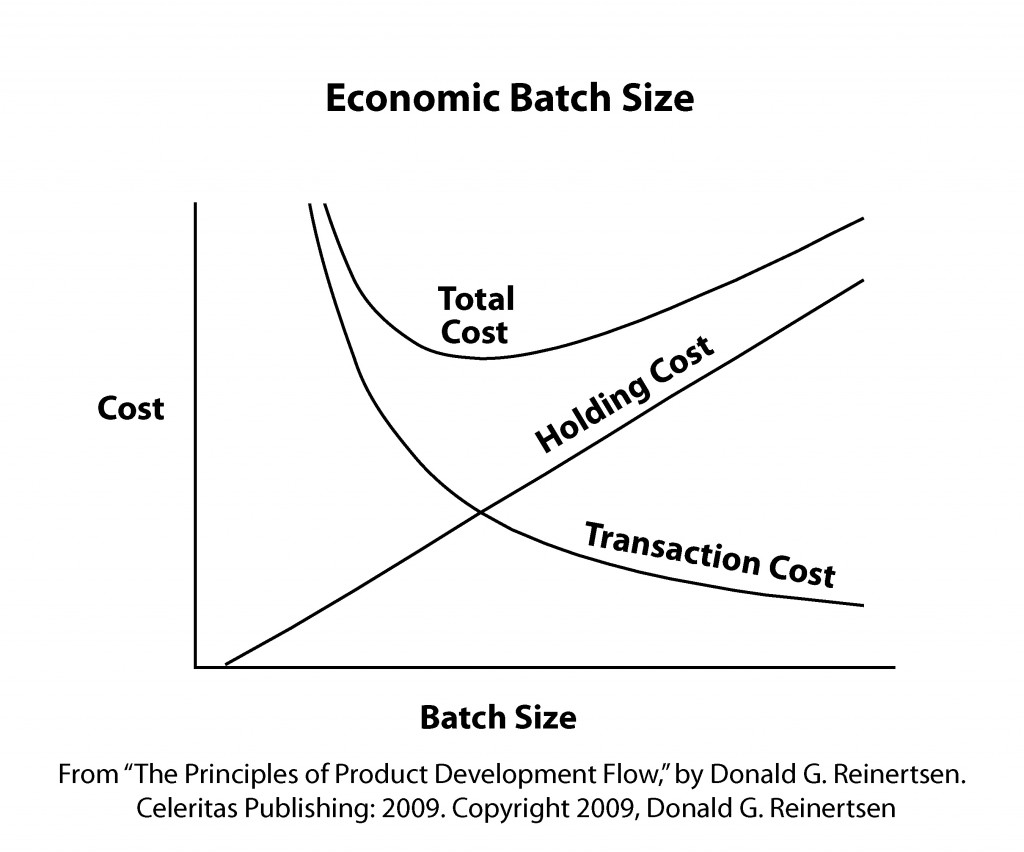
Firstly the optimal batch size is determined by the holding cost (driving smaller batch sizes) and transaction costs (driving larger batch sizes). In IT the holding costs are a combination of the increasing cost of fixing a problem later in the lifecycle and the missed benefit of functionality ready but not in production. These two factors don’t change much with DevOps. What changes are the transaction costs. Deployments, Testing efforts and migration to production are all aspects that DevOps has made cheaper through automation and through using the “minimum viable process” for governance. This means that the new batch size is much smaller than before. The relationship between DevOps maturity and batch size is something that I hope people start to appreciate more.

 “DevOps is not about making IT efficient, it’s about making business effective through IT.” – Mark Rendell

The second fantastic point that Don makes, which I want to elaborate on, is about effectiveness and efficiency in the context of quality – the smaller batch sizes at fast speed might cause more defects, but these are fixed faster and the learning from it leads to a better overall outcome. As I said in many other places defects are not a bad thing as long as you find them as early as possible and use them to learn. Driving down defects is not an outcome its a side effect of better DevOps practices. With the words of a colleague of mine: “DevOps is not about making IT efficient, it’s about making business effective through IT.”

The second publication that filled me with optimism that we can bury the factory analogy soon is Gary Gruver’s “Leading the Transformation” (http://itrevolution.com/books/leading-the-transformation/ ). He also calls out that executives have to accept the fundamental difference in complexity between IT work and manufacturing. Assuming that you can plan up-front and manage IT with the same tools as manufacturing leads to inappropriate behaviors. Especially his guidance on embarking on DevOps transformations is very valuable and provides a realistic experience.

“Executives need to understand that managing software and the planning process in the same way that they manage everything else in their organization is not the most effective approach. (…) First, each new software project is new and unique, so there is a higher degree of uncertainty in the planning.” – Gary Gruver

After reading Don’s article and Gary’s book – can any executive still argue that the principles of manufacturing still applies? Do we need more evidence? Cultural change is hard and takes a long time. But hopefully the IT industry will soon be filled with application studios full of skilled, creative and motivated knowledge workers and not with factories where each developer and tester is just a cog in the machine…thank you Don and Gary for putting a satisfied smile on my face while reading your publications. I have the torch in my hands and you have given me fire – lets burn those factories down… (in a figurative sense of course)

Picture: Hawaii – by Dan Tentler (Creative Commons License)

Impressions from DevOps Enterprise Summit 2015

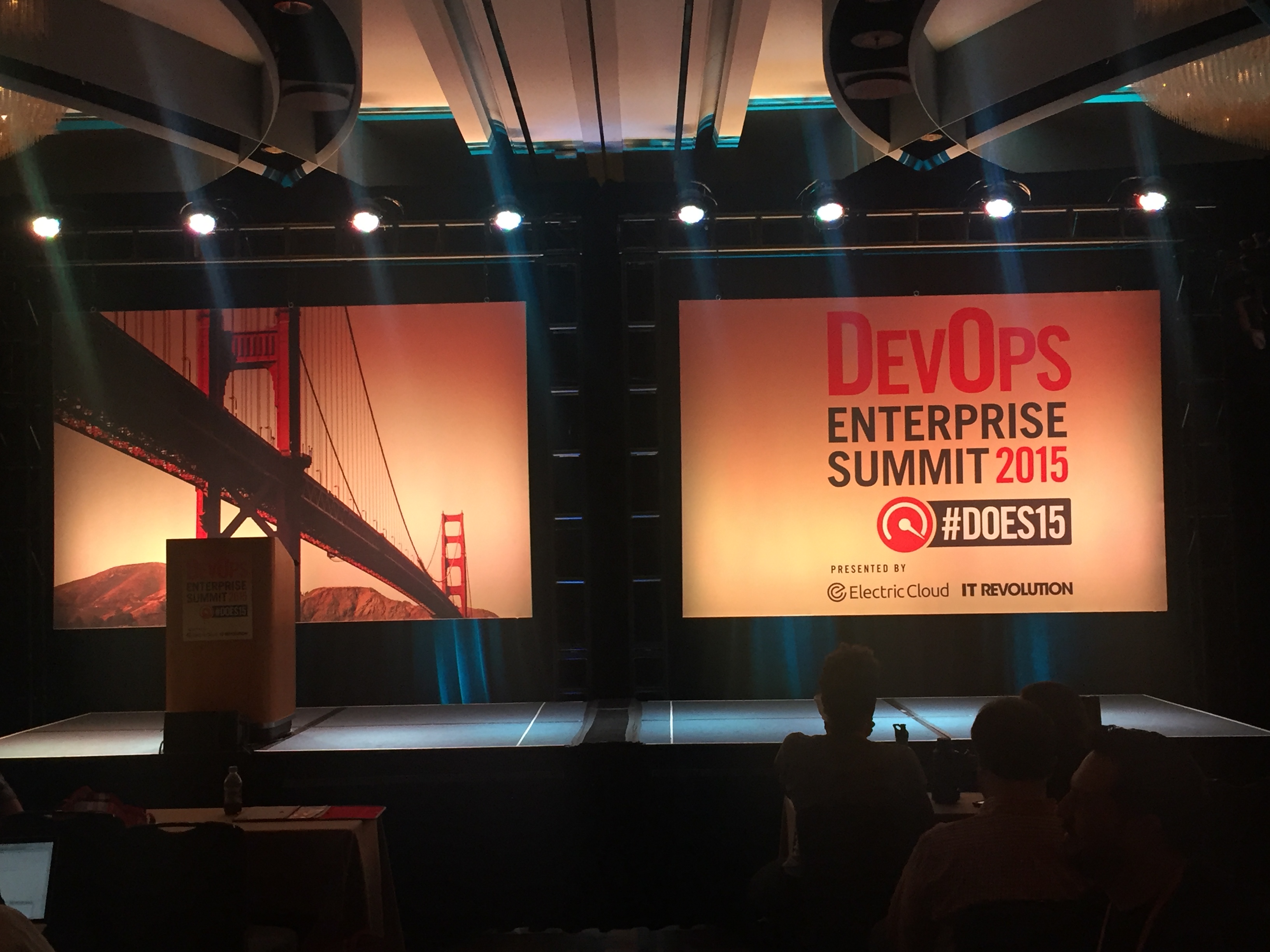
2015-10-21 15.13.19The theme of conference was so nicely summarised by Jody Mulkey from TicketMaster “DevOps is not a technology problem” already in the morning of Day 1.  Most talks covered the cultural aspects of DevOps and what good looks like and what it takes to transform the organisational culture. Some of my takeaways to try at home to shift culture are:

  • Blameless Culture
  • Value Stream mapping
  • Minimal Viable process
  • “Red Tape Removal teams”
  • Internal Conferences/Hack Days and other avenues for informal learning
  • ChatOps as communication channel

The other topic that came up again and again was: Metrics. Everyone is looking for ways to measure progress and justify improvement investment. This certainly validated the efforts of a working group before the conference. The working group put together a paper on measuring DevOps which you can get access to here http://devopsenterprise.io/media/DOES_forum_metrics_102015.pdf I was part of the team and have to thank everyone involved for a great experience and amazing support from the team at IT Revolution.

As part of the Unconference there was a very lively discussion about metrics. I think there was some level of consensus about a few points:

  • There is not one measure to rule them all, you need multiple dimensions for steerage
  • The metrics in focus shift over time
  • You should use the scientific method and drive improvements through hypothesis and validation

There was consensus that DevOps is not a goal – “are we there yet?” is not a valid question. Jason Cox summarised it nicely in his talk: “Keep moving forward with curiosity”. That is the spirit of the conference and the overall DevOps movement.

Technology wise – I think the practice/tool that stuck with me most was ChatOps. This seems to have broken into many organisations and is a tool to change culture and the way collaboration works.

Some highlight talks for me were – and there were so many more (!):

Jason Cox – Disney: Okay as a geek it would always be hard to trump a talk that is full of Star Wars references and shows the latest trailer. But besides this he is just great in giving insights into the Disney org and how to leverage the unique company culture for the DevOps movement.

Adrian Cockcroft – Battery Ventures: A fantastic talk about systems thinking applied to organisations. Fascinating insights into the cultures of companies like Netflix. So many ideas in the talk that it requires hearing it a few times to catch it all.

Damon Edwards – DTO solutions: This talk brought everything together what we heard throughout the conference. The summary slide shows the learning organisation, the measures, the idea of a journey not a goal to reach:devops-kaizen-practical-steps-to-start-sustain-a-transformation-42-638

Jez Humble: This talk one of the most interesting metrics for DevOps progress and success: Number of manhours required outside of business hours for a production deployment – the goal needs to be 0. Overall great talk about the architecture concerns for DevOps. Its an unsung truth that architecture plays a huge role in DevOps and is difficult to change.

Steve Spear – High Velocity Edge: About leading a learning organisation. He demonstrate with examples very well that leaders have to have the courage to lead from the front in regards to learning and acknowledging that they don’t know everything. The other takeaway was the rigorous adoption of the scientific method in all aspects of the organisation and the example of Toyota showcased how such an organisation destroys the competition.

Josh Corman & John Willis: An insightful talk about vulnerabilities in software and the importance of taking this serious, not just to save money, but to save lifes!

Topo Pal – Capital One: Topo’s point of Capital One contributing their tools to open source for the community was a powerful statement. We can all benefit from being more open and sharing more with the community. Thank you Topo.

Rosalind Radcliff – IBM: Educating us on what is possible with Mainframe. One of the few talks about “legacy” and really insightful that modern delivery methods are absolutely possible with the mainframe.

Mark Rendell – Accenture: Talking about the role platform applications play in solving the organisational structure challenge of scaling DevOps.

What did I get most value out of you wonder?

100% the discussions with people in the hallway, with fellow speakers, with all the people who are on the journey with me. Looking forward to make the next steps together and share our stories again next year.

Favourite Quotes:

  • “Motion != Work” Jason Cox & Jez Humble
  • “We cant copy Netflix because it has all those superstar engineers, we don’t have the people” Fortune 100 CTO —- “We hired them from you, and got out of their way” Adrian Cockcroft
  • You are either building a learning organization…or you are losing to someone who is – Andrew Clay Shafer requoted in USPTO session
  • “We are open sourcing our tools because it is the right thing to do.” Topo Pal, Capital One
  • “Buoys, not boundaries.” Ralph Loura, HP Enterprise
  • “Too much planning means you miss out on opportunities to learn and adjust.” Gary Gruver, co-author, “Leading the Transformation”
  • “We have horrible hygiene in our software supply chain” – Josh Corman, Sonatype
  • “I am in this (DevOps) to save lives” – Josh Corman, Sonatype
  • “We had Schroedinger releases – until it was in production we didn’t know whether it was dead or not” – Elisabeth Hendrickson
  • “Project based teams accrue technical debt, product or platform based teams pay it down” – Adrian Cockcroft

What I want to see more of next year:

  • People talking about managing vendors and systems integrators
  • Experiences with learning cultures and how the experiments went
  • Even more discussion on bridging the chasm to the organisational majority

Cultural references/Running Gags:

  • Lots of Star Wars references – aren’t we all looking forward to Christmas? How fitting we had Jason speak again.
  • Volkswagen gags were also popular

DevOps for Systems of Record – A new hope (Preview of DOES talk)

(This post first appeared on DevOps.com – Link)

I am speaking at the DevOps Enterprise Summit later this week and thought I give people a teaser of what I am going to talk about, so that you know what to expect. I am looking forward to share my story – a story of adversity but also of hope – with many of you. ( A recording of it is available here)

So we have all heard about the DevOps and Continuous Delivery stories from our favorite Web companies (Google, NetFlix,…). It is much harder to come across successful case studies with Enterprise-grade Systems of Record. While I cannot provide the 50 times a day deployments for SAP (yet ;-)), I wanted to share my story so far and what I have learned in the journey (both in regards to solve and unsolved issues).

Hopefully this contribution to the discussion helps some of those out there who are looking for a first step. But why should we even deal with COTS and other systems of record? Ultimately for me this comes back to the two gear analogy that I keep using. If you can just ditch your “legacy” applications completely, then congratulations you don’t have to deal with this and can probably stop reading this blog post. For all of you out there that cannot do that, you will be confronted with the reality that even though your digital and custom applications can deliver at amazing speed you are still somehow constraint by your “legacy” applications. Hence speeding up those will help you achieve the ultimate terminal velocity of your delivery organisation. So how do I approach Systems of Record and the DevOps adoption of it

3 Key steps:
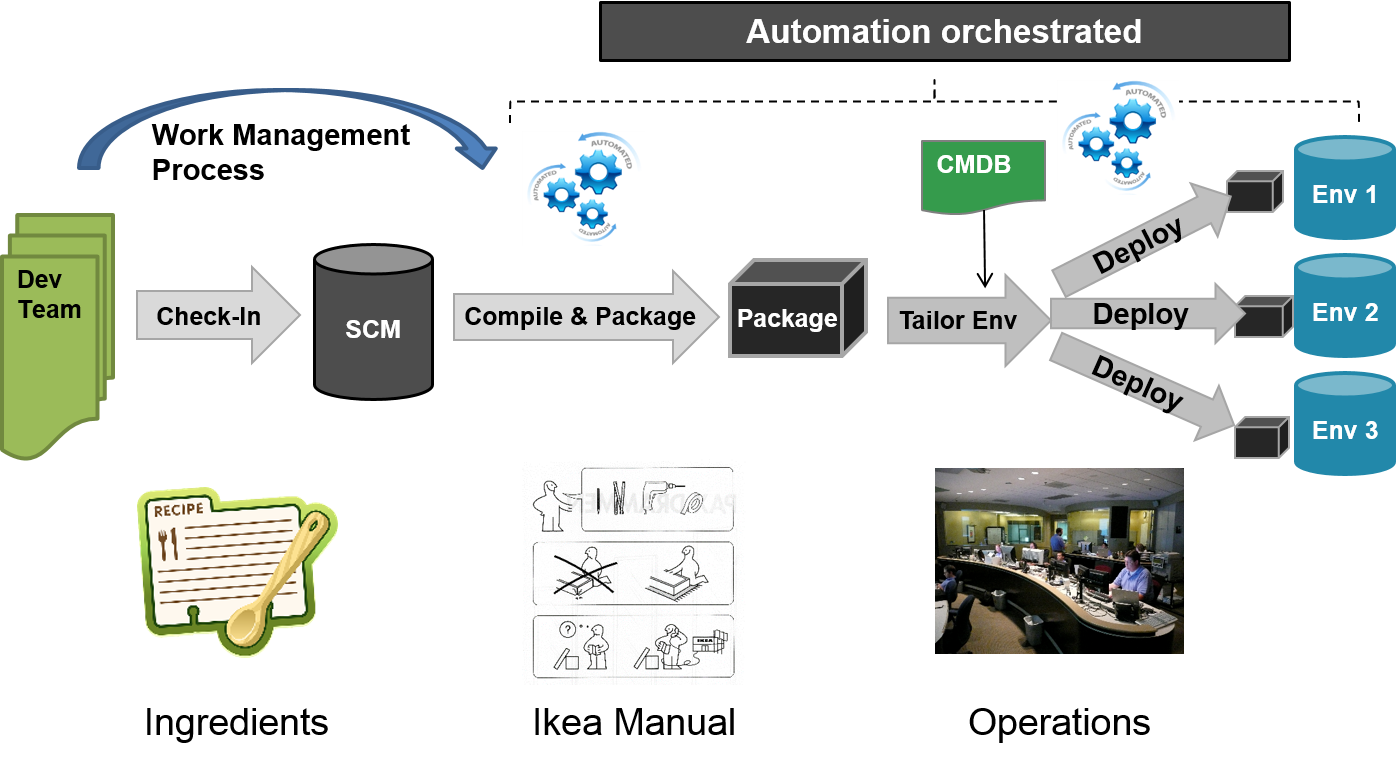
1. Look under the hood to find the ingredients
2. Recreate the IKEA manual
3. Understand the path to production

DOES1

  1. Initial Discovery – Let’s open the hood

DOES2Ultimately the two things that I am always looking for are the moving parts of the application and the processes to build and deploy the application. Sounds easy, right? Well it often isn’t as especially COTS application try to abstract those processes away. Look at SAP where you make configuration changes in one environment that then somehow get transported to other environments, but you have little visibility into the underlying process (Ok – my SAP experience is 10 years old, so it might have changed, but you get the gist).

Why do we look for moving parts? Well we want to use the common software engineering practices as much as we can and don’t necessarily want to trust the inbuild features for version control for example. So we look for ways to find the source code files or ways to extract the relevant information in text format (well SQL, XML, etc count as text in my world view), this is sometimes relatively easy (Siebel .sif files are just a type of XML for example) and sometimes it is pretty difficult or impossible. These underlying files is what we will store in source control to make sure we understand at each point in time the configuration of the application.

Once you have found the source code, you will have 3 things to do:
a) Get it out of the proprietary solution
b) Integrate it with your IDE
c) Solve for Merges
(I will explore this further in another blog post later)

Part 2. Recreate the IKEA manual
DOES3Once you have all the moving parts, you need to understand how it all fits together. Custom Application usually require explicit instructions which makes it much easier to define and automate the instruction set. For systems of record packaging and deployment is often done through UIs and there is usually more than one way of doing it. Experienced operators have found their own short cuts and the reliability of the system depends on having the right guy in the operating centre (I have some stories to tell about not having the right guy on go-live weekend).

Your goal needs to be an “Ikea Manual” that creates the system from the moving parts we identified earlier without requiring complex interactions or decisions from human operators. Ideally all instructions work from the commandline or some programming API, but when all else fails a UI driver like Selenium can solve the really tricky parts of creating and automating the manual. Every black-box step should be drilled open so that you understand what is happening within the system and so that you understand the variations that could cause you trouble down the path.

Part 3. Understand the Path to production
does4Speaking of paths…Of course for systems of record the same rules apply as for any other system. You should practice the exact things that you will do to establish the system in production in all previous environments and minimise the difference between configurations. The challenge for systems of records is often the cost associated with production like environments So you might have to look for creative ways to minimise the difference and to parameterise configurations so that you can at least automate for the differences.

So all is good in Mirco’s land of the systems of Record?
Unfortunately not, there are still many challenges that I am working on. The progress we have made so far, allowed for a step change in velocity and reliability, but there are still areas that I want to find better solutions for:

  • Unit test automation
  • Unsupported activities or no API
  • Performance
  • Configuration Management skills – the curse of the configurators
  • Common Objects
  • Operations – the last mile…

I will speak at much more detail about my experiences at the DevOps Enterprise Summit, if you are attending, come say Hi. I am always happy to show you the scars of working with Systems of records and share war stories.

And for two “legacy” technology stacks that I have done extensive work for (Siebel and Mainframe ) I promise to write more in-depth blog posts in the future.

The Testing Centre of Excellence is dead, Long Live the Centre of Quality Engineering

“Big, centralised Test Centres of Excellence are a thing of the past” – Forrester 2013

Agile clearly took the IT industry by storm. In my early days trying to bring Agile to projects a few years back I had to explain even what Agile means. Nowadays pretty much all my clients are using some kind of Agile somewhere in their organisation. Now we see the challenges of hot to support delivery in an Agile fashion and how to optimise for speed to market. One common obstacle is duration and effort for testing. Too many organisations are still relying on large scale manual inspection instead of having an optimised and automated approach to testing. Of course in most cases not everything can be automated, but it is far more common to see too little automation than to see too much automation.

“Quality comes not from inspection, but from improvement of the production process.“ – Dr W. Edward Deming

TCOE1The above picture illustrates the shift that is required to really support speed to market. Quality needs to be built into the development process from the beginning and every opportunity for early feedback should be used to avoid the late detection from manual inspection. There is so much good evidence showing that the temporal delay for finding defects is very costly. People don’t necessarily still remember what exactly they were thinking when they made a specific change a few weeks ago. Or worse the fix might even be given to someone completely different who first has to understand the context of the piece of code that he is trying to fix.

For many organisation this provides a challenge as most testing is organised centrally from a Testing Center of Excellence. This needs to change.

TCOE2Rather than having this large group of testers who are centrally organised, we need people with quality focus embedded in our Agile teams. The manual tester who just executes test scripts is a thing of the past mostly. The new roles require people who understand the business context and can come up with test strategies that minimise the risk in our application. Those test experts are the kind of people who look both ways on a one way street, they just think differently to other people and hence have a very specific mindset that we need.

“Good testers are the kind of people who look both ways before crossing a one-way street”

Besides creating test strategies they will also look after exploratory testing which finds things outside of the usual boundaries. And then we need the test automation developers who should also be embedded in the Agile teams. This decentralising of quality experts does not mean that there is no need for a central function. Test Automation requires a technical framework that should be owned by the central function. Additionally the central function should make sure that lessons learned and other experiences are being shared and that the profession of Automation Developers and Test strategists and Exploratory Testers continue to evolve. Providing networking opportunities, knowledge sharing session and more formal guidance on how to embed quality as early as possible in the development process should be the new focus. This also means to collaborate with the development and engineering teams on coding standards, on the way static code analysis is being used and what can be covered by automated unit testing. On the most basic level it is a shift from testing to quality engineering.

The nature of the central function will shift from a Testing Center of Excellence to a Center of Quality Engineering. Will this be difficult and transformation? Yes it will be and I will leave you with this thought that all TCOE practitioners (and testers for that matter) should take to heart:

“It is not necessary to change. Survival is not mandatory.“ – Dr. W. Edward Deming

What computer games can teach us about maturity models – Choose your own DevOps Adventure

To use maturity models or not is an eternal question that Agile and DevOps coaches struggle with. We all know that maturity models have some weaknesses, they can easily be gamed if they are used to incentivise and/or punish people, they are very prone to the Dunning-Kruger effect and often they are vague. Of course on the flipside, maturity models allow you to position yourself, your team or your company across a set of increasingly good practices and striving for the next level could be the required motivation to push ahead and implement the next improvement.

Clearly there are different reasons behind different kinds of maturity models. For a self-assessment and to set a roadmap, a traditional maturity model like the Accenture DevOps maturity model is what it takes to get these done. There are many others available on the internet, so feel free to choose the one you like best.

At one of my recent clients we performed many maturity assessments across a wide variety of teams, technologies and applications. Of course such large scope means that we did not spend a lot of time with each team to assess the maturity and not surprisingly the result was that we got very different levels of response. We heard things like “Of course we do Continuous Integration, we have Jenkins installed and it runs every Saturday”, had this team not mentioned the second part of the sentence we would have probably ticked the Continuous Integration box on the maturity sheet.

A few months later we were back in the same situation and needed to find a way to help teams self-assess their maturity in an environment where a lot of DevOps concepts are not well known and different vendors and client teams are involved which means the actual maturity rating becomes somewhat political. I was worrying about this for a while and then one night while playing on my PC, inspiration hit me – I remembered the good old Civilisation game and the technology tree:

techtree_original

Now if I could come up with a technology tree just like this for DevOps I might be able to use this with teams to document the practices they have in place and what it takes to get the next practice enabled. Enter the DevOps technology dependency tree (sample below):

CD Technical Dependencies Tree

In this tree for each leaf we created a definition and related metrics and now each team could go off and use this tree to chart where they are and how they progress. This way each team chooses their own DevOps adventure. We also marked capabilities that the company needed to provide so that each team could leverage common practices that are strategically aligned (like a common test automation framework or deployment framework). This tree has been hugely successful at this specific client and we continue to update it whenever we find a better representation and believe new practices should be represented.

Who would have thought that playing hours of computer games would come in handy one day…

DevOps in Scaled Agile Models – Which one is best?

DevOps in ScaledAgileI have already written about the importance of DevOps practices (or for that matter Agile technical practices) for Agile adoption and I don’t think there are many people arguing for the contrary. Ultimately, you want those two things to go hand in hand to maximise the outcome for your organisation. In this post I want to have a closer look at popular scaling frameworks to see whether these models explicitly or implicitly include DevOps. One could of course argue that the Agile models should really focus on just the Agile methodology and associated processes and practices. However, given that often the technical side is the inhibitor of achieving the benefits of Agile, I think DevOps should be reflected in these models to remind everyone that Software is being created first and foremost by developers.

Let’s look at a few of the more well known models:

SAFE (Scaled Agile Framework) – This one is probably the easiest as it has DevOps being called out in the big picture. I would however consider two aspects of SAFe as relevant for the wider discussion, the DevOps team and the System Team. While the DevOps team talks about the aspects that have to do with deployment into production and the automation of the process, the System Team focuses more on the development side activities like Continuous Integration and Test automation. For me there is a problem here as it feels a lot like the DevOps team is the Operations team and the System Team is the Build team. I’d rather have them in one System/DevOps team with joint responsibilities. If you consider both of them as just concepts in the model and you have them working closely together then I feel you start getting somewhere. This is how I do this on my projects.

DAD (Disciplined Agile Delivery) – In DAD, DevOps is weaved into the fabric of the methodology but not as nicely spelled out as I would like. DAD is a lot more focused on the processes (perhaps an inheritance from RUP as both are influenced/created by IBM folks). There is however a blog post by “creator” Scott Ambler that draws all the elements together. I still feel that a bit more focus on the technical aspects of delivery in the construction phase would have been better. That being said, there are few good references if you go down to the detailed level. The Integrator role has an explicit responsibility to integrate all aspects of the solution and the Produce a Potentially Consumable Solution and Improve Quality processes call out many technical practices related to DevOps.

LESS (Large Scale Scrum) – In LESS DevOps is not explicitly called out, but is well covered under Technical Excellence. Here it talks about all the important practices and principles and the descriptions for each of them is really good. LESS has a lot less focus on telling you exactly how to put these practices in place, so it will be up to you to define which team or who in your team should be responsible for this (or in true Agile fashion perhaps it is everyone…).

In conclusion, I have to say that I like the idea of combining the explicit structure of SAFE with the principles and ideas of LESS to create my own meta-framework. I will certainly use both as reference going forward.

What do you think? Is it important to reflect DevOps techniques in a Scaled Agile Model? And if so, which one is your favourite representation?

8 DevOps Principles that will Improve Your Speed to Market

I recently got asked about the principles that I follow for DevOps adoptions, so I thought I’d write down my list of principles and what they mean to me:

  • Test Early & Often – This principle is probably the simplest one. Test as early as you can and as often as you can. In my ideal world we find more and more defects closer to the developer by a) running tests more frequently enabled by test automation, b) providing integration points (real or mocked) as early as possible and c) minimising the variables between environments. With all this in place the proportion of defects outside of the development cycle should reduce significantly.
  • Improve Continuously – This principle is the most important and hardest to do. No implementation of DevOps practices is ever complete. You will always learn new things about your technology and solution and without being vigilant about it, deterioration will set in. Of course the corollary to this is that you need to measure what you care about, otherwise all improvements will be unfocused and you will be unable to measure the improvements. You should measure metrics that best represent the areas of concern for you, like cycle time, automation level, defect rates etc.
  • Automate Everything – Easier said than done, this is the one most people associate with DevOps. It is the automation of all processes required to deliver software to production or any other environment. For me this goes further than that, it means automating your status reporting, integrating the tools in your ecosystem and getting everyone involved to focus on things that computers cannot (yet) do.
  • Cohesive Teams – Too often I have been in projects where the silo mentality was the biggest hindrance of progress, be it between delivery partner and client, between development and test teams or between development and operations. Not working together and not having aligned goals/measures of success is going to make the technical problems look like child’s play. Focus on getting the teams aligned early on in your process so that everyone is moving in the same direction.
  • Deliver Small Increments – Complexity and interdependence are the things that make your cycle time longer than required. The more complex and interdependent a piece of software is, the more difficult it is to test and to identify the root cause of any problem. Look for ways to make the chunks of functionality smaller. This will be difficult in the beginning but the more mature you get, the easier this becomes. It will be a multiplying effect that reduces your time to market further.
  • Outside-In Development – One of the most fascinating pieces of research I have seen is by Walker Royce about the success of different delivery approaches. He shows that delays are often caused by integration defects that are identified too late. They are identified late because that’s the first time you can test time in an integrated environment. Once you find them you might have to change the inner logic of your systems to accommodate the required changes to the interface. Now imagine doing it the other way around, you test your interfaces first and once they are stable you build out the inner workings. This reduces the need of rework significantly. This principle holds for integration between systems or for modules within the same application and there are many tools and patterns that support outside-in development.
  • Experiment Frequently – Last but not least you need to experiment. Try different things, use new tools and patterns and keep learning. It’s the same for your business, by using DevOps you can safely try new things out with your customers (think of A/B testing), but you should do the same internally for your development organisation. Be curious!

If you follow these 8 principles I am sure you are on the right track to improve your speed to market.

Working with SIs in a DevOps/Agile delivery model

In this blog post (another of my DevOps SI series), I want to explore the contractual aspects of working with SI (System Integrator). At the highest level there are three models that I have come across:

  • Fixed Price contract – Unfortunately these are not very flexible and usually require a level of detail to define the outcome, which is counterproductive for Agile engagements. It does however incentivise the SI to use best practices to reduce the cost of delivery.
  • Time and Material – This is the most flexible model that easily accommodates any scope changes. The challenge for this one is that the SI does not have an incentive to increase the level of automation because each manual step adds to the revenue the SI makes.
  • Gain Share – This is a great model if your SI is willing to share the gains and risks of your business model. While this is the ideal model, often it is not easy to agree on the contribution that the specific application makes to the overall business.

So what is my preferred model? Well let me start by saying that the contract itself will only ever be one aspect to consider, the overall partnership culture will likely make a bigger impact than the contract itself. I have worked with many different models and have made them work even when they were a hindrance for the Agile delivery approach. However, if I had to define a model that I consider most suitable (Ceteris Paribus – all other things being equal), I would agree on a time and materials contract to keep the flexibility. I would make it mandatory to do joint planning sessions so that both staff movements and release schedule are done in true partnership (it does not help if the SI has staffing issues the client is not aware of or the client makes any ramp-ups/ramp-downs the SI’s problem). I would agree on two scorecards that I would use to evaluate the partnership. One is a Delivery Scorecard, which shows the performance of delivery, things like: are we on track, have we delivered to our promises, is our delivery predictable. The second is an Operational Scorecard , which shows: the quality of delivery, the automation levels in place, the cycle times for key processes in the SDLC.

With these elements I feel that you can have a very fruitful partnership that truly brings together the best of both worlds.