Category Archives: Uncategorized

How to Fail at Test Automation

(This post was first published on DevOps.com)

Let me start by admitting that I am not a test automation expert. I have done some work with test automation and have supervised teams who practiced it, but when it comes to the intricacies of it, I have to call a friend. It is from such friends that I have learned why so many test automation efforts fail. Talking to people about test automation validates my impression that this is the DevOps-related practice that people most often fail at.

Let me share the four reasons why test automation fails, in the hope that it will help you avoid these mistakes in your test automation efforts.

Before I go into the four reasons, allow me one more thought: Test automation is actually a bad choice of word. You are not automating testing, you automate quality assessments. What do I mean by that? It is a mistake to think of test automation as automating what you otherwise would do manually. You are finding ways to assess the quality of your product in automated ways and you will execute it way more often than you would do manual testing. This conceptual difference explains to a large degree the four reasons for test automation failure below.

Reason 1: Underestimating the Impact on Infrastructure and the Ecosystem

There is a physical limit of how much pressure a number of manual testers can put on your systems. Automation will put very different stress on your system. What you otherwise do once a week manually you might now do 100 times a day with automation. And into the mix an integrated environment, which means external systems need to respond that frequently, too. So you really have to consider two different aspects: Can your infrastructure in your environments support 100 times the volume it currently supports, and are your external systems set up to support this volume? Of course, you can always choose to reduce the stress on external systems by limiting the real-time interactions and stub out a certain percentage of transactions or use virtual services.

Reason 2: Underestimate the Data Hunger

Very often test automation is used in the same system where manual testing takes place. Test automation is data-hungry, as it needs data for each run of test execution and, remember, this is much more frequent than manual testing. This means you cannot easily refresh all test data whenever you want to run test automation and have to wait until manual testing reaches a logical refresh point. This obviously is not good enough; instead, you need to be able to run your test automation at any time. There are a few different strategies you can use (and you will likely use a combination):

  • Finish the test in the same state of data that you started with;
  • Create the data as part of the test execution;
  • Identify a partial set of data across all involved applications that you can safely replace each time; or
  • Leverage a large base of data sets to feed into your automation to last until the next logical refresh point.

Reason 3: Not Thinking About the System

Test automation often is an orchestration exercise as the overall business process in test flows across many different applications. If you require manual steps in multiple systems, then your automation will depend on orchestrating all those. By just building automation for one system you might get stuck if your test automation solution is not able to be orchestrated across different solutions. Also, some walled-garden test automation tools might not play well together, so think about your overall system of applications and the business processes first before heavily investing in one specific solution for one application.

Reason 4: Not Integrating it into the Software Development Life Cycle

Test automation is not a separate task; to be successful it needs to be part of your development efforts. From the people I have spoken to there is general agreement that a separate test automation team usually doesn’t work for several reasons:

  • They are “too far away” from the application teams to influence “ability to automate testing,” which you want to build into your architecture to be able to test the services below the user interface;
  • Tests often are not integrated in the continuous delivery pipeline, which means key performance constraints are not considered (tests should be really fast to run with each deployment);
  • Tests often are not executed often enough, which means they become more brittle and less reliable. Tests need to be treated at the same level as code and should be treated with the same severity. This is much easier when the team has to run them to claim success for any new feature and is much harder to do when it is a separate team who does the automation. It also will take much longer to understand where the problem lies.

Of course, absence of failure does not mean success. But at least I was able to share the common mistakes I have seen and, as they say, “Learning from others’ mistakes is cheaper.” Perhaps these thoughts can help you avoid some mistakes in your test automation journey. I do have some positive guidance on test automation, too, but will leave this for another post.

And in the case you found your own ways of failing, please share it in the comments to help others avoid those in the future. Failures are part of life and even more so part of DevOps life (trust me, I have some scars to show). We should learn to share those and not just the rosy “conference-ready” side of our stories.

Test automation is for me the practice that requires more attention and more focus. Between some open-source solutions and very expensive proprietary solutions, I am not convinced we in the IT industry have mastered it.

One bonus thought: If you cannot automate testing, automate the recording of your testing.

If you cannot automate testing, find a way to record the screen with each test by default. Once you identify a defect you can use the recording to provide much richer context and make it a lot easier to find the problem and solve it. Verbal descriptions of error are very often lacking and don’t provide all the context of what was done. I keep being surprised how long triage takes because of the lack of context and detail in the defect description. There is really no excuse for not doing this. Record first, discard if successful, attach it to the defect record if you find a problem.

Is there such a thing as Hybrid Agile?

I recently wrote an article about Hybrid Agile for InfoQ  because the term has been misused too often. Feel free to read the whole article. Here is my conclusion from the article:

After many discussions, people convinced me that “Hybrid-Agile” is what is otherwise called Water-Scrum-Fall and after some deliberation I admit that this makes sense to me. Of course the term Water-Scrum-Fall or similar phrases are often used with contempt or smiled upon, but when you look closer, this is reality in many places and for good reasons.

Managing the Plethora of DevOps tools

I have been thinking about DevOps tools a lot and discussions about tools often distract from the real problems. But what are the right DevOps tools. Well I will not go into specific tools, instead I will tell what I am looking for in DevOps tools beyond the functionality they provide. In my experience you can build good DevOps tools chains with just about any tool, but some tools might take more effort to integrate than others. I will also provide some guidance on how to manage tools at the enterprise level.

It seems that new DevOps tools appear on the market every month. This is extenuated by the fact that it is difficult to classify all the tools in the DevOps toolbox. One of the best reference guides is the xebialabs periodic table of DevOps tools (https://xebialabs.com/periodic-table-of-devops-tools/ ) which is well worth checking out.

Before I go into the details of what characteristics a good DevOps tool should have, I want to address one other aspect: Should you have one tool or many in the organization?

In general, in large organization it makes sense to have a minimal set of tools to support for several reasons:

  • Optimise license cost
  • Leveraging skills across the organization
  • Minimising complexity of integration

Yet on the other side some tools are much better for specific contexts than others (e.g. your .NET tooling might be very different to your mainframe tooling). And then there are new tools coming out all the time. So how do you deal with this? Here is my preferred approach:

  • Start with small set of standard tools in your organization
  • Allow a certain percentage of teams to diverge from the standard for a period of time (3-6 months perhaps)
  • At the end of the “trial-period’ gather the evidence and decide what to do with the tool in discussion
    • Replace the current standard tool
    • Get it added as an additional tool for specific contexts
    • Discard the tool and the team transitions back to the standard tool

Obviously DevOps tools should support DevOps practices and promote the right culture. This means the tools should not be a “fenced garden” and only work within their own ecosystem. It is very unlikely anyway that a company uses only tools from one vendor or ecosystem. Hence the most important quality of tools is the ability to integrate it with other tools (and yes possibly be able to replace it which is important in such a fast moving market.)

  1. So then the first check is how well APIs are supported. Can you trigger all functionality that is available through the UI via an API (command line or programming language based)?
  2. We should treat our tools just like any other application in the organization, which means we want to version control it. The second check is hence whether all configuration of the tool can be version controlled in an externalised configuration file (not just in the application itself)?
  3. Related to the second point is the functionality to be able to support multiple environments for the tool ( e.g. Dev vs Prod). How easy is it promote configuration? How can you merge configuration of different environments (code lines)?
  4. We want everyone in the company to be able to use the same tool. This has implications for the license model that is appropriate. Of course open source works for us in this case, but what about commercial tools? They are not necessarily bad. What is important is that they don’t discourage usage. For example tools that require agents should not price for every agent as this means people will be tempted to not use it everywhere. Negotiate an enterprise wide license or ‘buckets of agents’ so that not each usage will require a business case.
  5. Visualization and analytics are important aspects of every DevOps toolchain. To make this work we need easy access to the underlying data and that means we likely want to export data or query data. If your data is stored in an obscure data model or you have no way to access the underlying data and export it for analysis and visualization then you will require additional overhead to get good data. Dashboards and reports within the tool are no replacement as you likely want to aggregate and analyse across tools.

I hope these criteria are all relatively clear. What is surprising is how few tools adhere to these. I hope tool vendors will start to realize that if they want to provide DevOps tools they need to adhere to the cultural values of DevOps to be accepted in the community.

Hopefully the tools you are using are adhering to many of these points. Let me know what you think in the comments section of this blogpost. I am very curious to learn how you perceive DevOps tools.

Thoughts on the State of DevOps 2015 report

state of devops front

So I have been re-reading the state of DevOps report (https://puppetlabs.com/2015-devops-report ) recently on the plane to my project and found a few interesting aspects that are worth highlighting – especially as they are matching my experience as well. It shows a much more balanced view than the more common unicorn-approach to DevOps.

First of all – I am glad that the important of deployments is highlighted. To me this is the core practice of DevOps, without reliable and fast deployments all the other practices are not effective, whether that is Test Automation or Environment provisioning. So this part from the report clearly is one of my favourites:

Deployment pain can tell you a lot about your IT performance. Do you want to know how your team is doing? All you have to do is ask one simple question: “How painful are deployments?” We found that where code deployments are most painful, you’ll find the poorest IT performance, organizational performance and culture.” – Page 5

And there is a whole page discussing this aspect on page 26, but here the summary steps to take:

  • Do smaller deployments more frequently (i.e., decrease batch sizes).
  • Automate more of the deployment steps.
  • Treat your infrastructure as code, using a standard configuration management tool.
  • Implement version control for all production artifacts.
  • Implement automated testing for code and environments.
  • Create common build mechanisms to build dev, test and production environments.

And even the speed to market with around 50% having more than a month of lead time to production feels about right (Page 11)

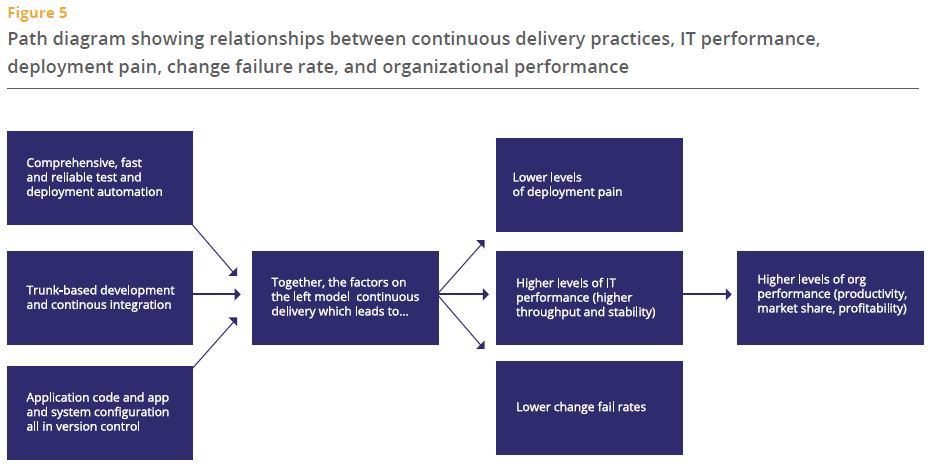
The two models on page 14 and 15 are quite good, there is not much new in this, but the choice of elements I think speaks to changes in the DevOps discussion that I have seen over the last 18 months and which I see on my projects too – and it highlights visualisation of data as one key ingredient. It’s such an important one, yet the one that not many spend their energy (and money) on. Probably because there is no obvious and easy tool choice (CapitalOne for example developed their own custom dashboard – https://github.com/capitalone/Hygieia & http://thenewstack.io/capital-one-out-to-display-its-geekdom-with-open-source-devops-dashboard/ ). The report goes on to advice “Turn data into actionable, visible information that provides teams with feedback on key quality, performance, and productivity metrics” – Amen.

Here are the two models from the report:

Model 1Model 2

And of course based on my recent discussion about DevOps for Systems of Record (Link here) I was glad to see the following statement in the report:

 “It doesn’t matter if your apps are greenfield, brownfield or legacy — as long as they are architected with testability and deployability in mind, high performance is achievable. We were surprised to find that the type of system — whether it was a system of engagement or a system of record, packaged or custom, legacy or greenfield — is not significant. Continuous delivery can be applied to any system, provided it is architected correctly.” – Page 5

Overall I think this report is really useful and represents what I see in my projects and at my clients very well. It also discusses the kind of investments required to really move forward (page 25) and provides guidance on many aspects of the DevOps journey. I am looking forward to see what the next year will bring.

Microservices 101 – What I have learned so far

lego-252602_960_720It is kind of difficult to walk the DevOps circles without hearing the word Microservices being mentioned again and again. I have sat through a bunch of conference talks about the topic and only recently came across a couple that were practical enough that I took things away from that have applicability in my normal project work. The below is heavily influenced by the talks at this year’s YOW conference and the talks at the DevOps Enterprise summit of the last two years.

What are Microservices?

Microservices are the other extreme of monolithic applications. So far, so obvious. But what does this mean. Monolithic applications look nice and neat from the outside, they behave very well in architecture diagrams as they are placeholders for “magic happens here” and some of the complexity is absorbed into that “black box”. I have seen enough Siebel and some SAP code that tells me that this perceived simplicity is just hidden complexity. Microservices make the complexity more visible. As far as catchy quotes go, I like Randy Shoup’s from YOW15: “Microservices are nothing more than SOA done properly.” Within this lies most of the definition of a good Microservice: It is a service (application) that is for one purpose, it is self-contained and independent, has a clearly defined interface and isolated persistence (even to the point of having a database per service).

An Analogy to help:

“This, milord, is my family’s axe. We have owned it for almost nine hundred years, see. Of course, sometimes it needed a new blade. And sometimes it has required a new handle, new designs on the metalwork, a little refreshing of the ornamentation . . . but is this not the nine hundred-year-old axe of my family? And because it has changed gently over time, it is still a pretty good axe, y’know. Pretty good.”

This is what Microservices do to your architecture…

What are the benefits of Microservices?

Over time everyone in IT has learned that there is no “end-state architecture”. The architecture of your systems always evolves and as soon as one implementation finishes people are already thinking about the next change. In the past the iterations of the architecture have been quite difficult to achieve as you had to replace large systems. With microservice you create an architecture ecosystem that allows you to change small components all the time and avoid big-bang migrations. This flexibility means you are much faster in evolving your architecture. Additionally the structure of Microservices means that teams have a larger level of control over their service and this ownership will likely see your teams become more productive and responsible while developing your services. The deployment architecture and release mechanism becomes significantly easier as you don’t have to worry about dependencies that need to be reflected in the release and deployment of the services. This of course comes with increased complexity in testing as you have many possible permutations of services to deal with, so automation and intelligent testing strategies are very important.

When should you use Microservices?

In my view Microservices are relevant in areas that you know your company will invest in over time. Areas where speed to market is especially important are a good starting point as speed is one of the key benefits of Microservice where dependency-ridden architecture get bogged down. This is due to many reasons from developers having to learn about all the dependencies of their code to the increasing risk of component to be delayed in the release cycle. Microservice wont have those issues. Another area to look for is applications that cannot scale vertical much longer in an economic fashion, the horizontal scaling abilities of microservices specific to those services increases the possibilities to find economic scaling models. And of course a move towards Microservices requires investment, so go for an area that can afford the investment and where the challenges mentioned above are providing the burning platform to start your journey.

What does it take to be successful with Microservices?

This will not surprise you, but the level of extra complexity that comes with independently deployable services which then also might exist in production in multiple versions, means you need to really know your stuff. And by this I mean you need to be mature in your engineering practices, have a well oiled deployment pipeline with “Automated Everything” (Continuous Integration, Deployment, Testing). Otherwise the effort and complexity in trying to maintain this manually will quickly outweigh the benefits of Microservices. Conway’s Law says that systems resemble the organisational structure they were build in. To build Microservices we hence need to have mastered the Agile and DevOps principle of Cross-Functional teams (and ideally they are aligned to your value streams). These teams have full ownership of the Microservices they create (from cradle to grave). This makes sense if the services are small and self-contained as having multiple teams (DBAs, .NET developers,…) involved would just add overhead to small services. As you can see my view is that Microservices are the next step of maturity from DevOps and Agile as they require organisations to have already mastered those (or being close to at least).

How can you get started?

If your organisation is ready (which similarly to Agile and DevOps is a prerequisite for the adoption of Microservices) go ahead and choose a pilot and create a Microservice that adheres to the definition above and is of real business value (e.g. something that is being used a lot, is customer facing and is in a suitable technology stack). Your first pilot is likely not going to be a runaway success, but you will learn from the experience. Microservices will require investment from the organisation and the initial value might not be clear cut (as just adding the functionality to the monolith might be cheaper initially), but in the long term the flexibility, speed and resilience of your Microservice architecture will change your IT landscape. Will you end with a pure Microservice architecture? Most likely not. But your core services might just migrate to an architecture that is build and designed to evolve and hence serve you better in the ever changing marketplace.

Now – over to you. Let me know what you have learned by using Microservices, whether you think the above is true or did you have different experiences. Looking forward to hear what the current state of play is in regards to Microservices.

Last but not least some references to good Microservices talks:

Randy Shoup https://www.youtube.com/watch?v=hAwpVXiLH9M

James Lewis https://www.youtube.com/watch?v=JEtxmsJzrnw

Jez Humble https://www.youtube.com/watch?v=_wnd-eyPoMo

Why our DevOps maturity has not improved as much as I expected 15 years ago

PrintOne thing that continues to fascinate me is how after so many years I can still walk into IT organisations and see basic practices not being followed (e.g. Software Configuration Management or Continuous Integration or …). Shouldn’t we all know better?!? I recently came across some slides from the late 90s and early 2000s that pretty much read like something that comes from a DevOps conference today. So I wonder what is it that has prevented us from being better today and I think I found a feasible answer to my question.

For illustrative purposes I have used the Accenture DevOps maturity model, but feel free to use any other model here as the tendency would be similar. I believe that as an industry we used to be better than we are today (of course all generalisations are dangerous, including this one). While it is hard to find hard evidence for this, let me try to justify my perspective.

DevOps Journey

More than 10 years ago we had much more custom development to solve the big problems and most work was done onshore in collocated teams. The only way to be more productive and reduce cost was to have better engineering practices and leverage more automation, hence companies invested in this. We used to be on the mature end of consistent in many places. Then two trends caused us to regress as far as engineering practices are concerned:

  • Offshoring – With the introduction and mastering of offshore delivery, the industry had an alternative to automation and good engineering practices as labour arbitrage was providing a quick fix to cost reduction. It was potentially cheaper to do something manually offshore than maintaining or introducing automation onshore. Of course this couldn’t last as the labour cost offshore increased steadily. Some organisations stayed the course of engineering practices and automation others lost maturity along the way. This trend is similar to the same trend in manufacturing where manual labor became so cheap that automation wasn’t a critical element to cost reduction anymore. Those companies who went offshore did not sufficiently focus on automation and good practices as it was harder to oversea this with across locations and cost reductions were easy to achieve.
  • Packaged and proprietary Software – As we leveraged more and more packaged and proprietary software we relied on those vendors to provide the solution to our productivity challenges. This led over time to island solutions, which supported specific packages, but are not open enough to integrate into the IT ecosystem. How do you baseline an enterprise wide software package when configuration management is hidden in a package or worse still configuration is only possible through a graphical user interface with no access to the underlying source code/text files? The pre-packaged software was a quick fix to get functionality, but again the good engineering practices were lost out of sight. And many organisations make so many customisations that they should really treat the original “COTS” just like any other application with the same rigor. The other problem that packaged software introduced is that the people customising them are often considered or consider themselves not to be programmers (which means they don’t have to worry about those practices that the custom application developers use), a dangerous mistake in my view.

“Speed is the new currency of IT and businesses”

This was all well and good when cost as expressed by the cost of a day of labor was the main driver for optimisation in organisations. This paradigm has shifted and nowadays speed to market is driving incentives and behaviour. Organisations across the globe are trying to find ways to speed up their delivery processes without risking quality. But how do you now revert the trend that many organisations followed – your IT organisations is mainly outsourced and/or offshored, you have an application architecture that is a mix of packaged software, proprietary solutions and custom elements and you lack the engineering experience and skills to fix it.

This is where we need to acknowledge that DevOps is a journey that is different for every organisation. Of course there are the engineering driven organisations like Etsy, Amazon and Facebook that have engineers/IT people in their C-suite of executives who intuitively understand the importance of application architecture and good engineering. I believe they won’t ask you for a business case for what is ultimate an optimisation for speed and flexibility – they understand how important good IT is – at least I believe that to be the case. They will also consider which applications to introduce into their ecosystem and making sure that those are open products for which good engineering practices can be employed. In other organisations the adoption of DevOps practices needs to be supported by business cases that are often difficult to create (especially in the middle maturity levels where the pain is not at mission-critical levels and the full benefit of highest maturity is not yet in arms reach). Organisations that are on this journey with the majority of us in the industry need to acknowledge the sometimes intangible nature of improvements. Speed to market and other cycle time measures should be the guides for your journey.

“Everyone is on the DevOps journey, whether you know it or not”

The question whether “you are doing DevOps or not” is not valid in my view. We are all on the DevOps journey, it’s the journey of improving delivery of IT solutions. DevOps is a broad field and provides us with an ever growing toolkit of practices and tools. All of us IT Executives are on the search to improve our organisations and our delivery capabilities. What label we use for that doesn’t matter as long as we keep moving forward and keep experimenting. Is there a goal to this journey? No, I don’t think there is concrete goal, a state when we declare we are done. I think the best of us will keep pushing forward no matter how good we are getting at it and from what I have seen during my travels there is still plenty of road in front of me that I can see and I don’t need to worry about getting “there” anytime soon in any case. Join me on the journey and may our paths cross to share stories of our adventures on the road.

Note: This post was first published on DevOps.com.

Have we Agilists misused the military as example of Command & Control

Washington_Crossing_the_Delaware_by_Emanuel_Leutze,_MMA-NYC,_1851 (1024x656)If you are like me you believed since early days in your life, that the military is the example for command and control. I personally have never experienced the military by myself, but frequently I heard phrases like “We are not as strict with our command and control as the military”. Only recently after hearing from Don Reinertsen and Mark Horstman about their experiences in the military did I come to question my understanding.

“No plan survives the contact with the enemy” – from Helmuth von Moltke the Elder

So in my head I had this organisation where everything is well planned and if anything I would have associated it with the “waterfall” mentality more than an “agile” mentality. But let’s look a bit closer. In any real combat situation the enemy will behave differently to what you expect and it is very unreasonable to account for all possible details in the field. The above quote from von Moltke the Elder demonstrates that. So clearly the planning in detail and then just executing the plan approach will not work in such cases. So how does the military then operate?

The military makes sure that the soldiers understand what the goal of the mission is. Planning is being done on a high level (which mountain to take or what strategic points to take) which then breaks down into more detailed plans and not just for one scenarios. When practicing some variables get changed so that the soldiers learn to improvise and replan as more information about the situation becomes available. Does this sound familiar? It sounds exactly like the behaviour of an Agile team (with the difference that Agile teams don’t get the chance to practice their projects many times before doing it for real).

What this allows is a high-speed of decision while still adhering to a high level plan. It is possible because the organisation is aligned on the goals and high level plan. Imagine soldiers always had to wait in the field until the “project plan” is updated before they can proceed with changes to the plan. That would take way too long, so they are empowered to change as required within certain well-known parameters. By pushing decisions down to the lowest level the speed of decisions improves. And with clear parameters of what they can decide and what not, the risk of these decision is adjustable. When the lower level decisions aggregate to changes to the overall plan, then there are people at this level who can make those decisions as well (the product owners and release train engineers I guess).

I certainly think differently about the military now after hearing stories and examples that show how inherently agile they have to be. It makes for a good organisational example of combining high level plans and goals with agility and how to achieve positive results.

Here is a slide from Don’s talk with a few additional points:

military

I am no expert in the military so I am looking forward to your thoughts and I will surely learn from the discussion.

How to manage 100s of emails a day without going mad

21579892786_e3d206d567_zIf you are like me, you get hundreds of emails each day and more often than not you think that you would be more productive at work without the most frequently used communication method these days. Over the years I have tuned my processes and have adopted them with functionality becoming available in Outlook (my mail client of choice). I want to share my system with the rest of the world as it works reasonably well for me and perhaps can benefit others as well.

  1. Turn off notifications

The most important thing about emails is that they should not distract from any work you are doing. So do yourself a favor and go into outlook and turn off the notifications – and I mean all notifications: The sound, the little pop-up and the tray notifications. Any of those will cause you to get curious and quickly check the email and you will be immediately distracted. Same counts for your phone, set the phone to fetch and not push, so that your phone is not alerting you to new emails constantly by vibrating in your pocket or worse making a noise. On a regular basis when you have a break between other tasks you can check on your emails and you should put regular times in your calendar to go through your emails in one batch.

  1. Use Rules to direct the traffic

The inflow of traffic in your inbox can be overwhelming, especially if you get notifications from automated systems (like production monitoring). So the next important step in my system is to setup rules that automatically direct emails into different folders. I have setup a whole long list of rules, but a few core rules are the following: Emails that you are CC’d on (because they are of lower priority), Emails from your boss(es) (because they are of higher priority), Newsletters (of lowest priority), emails from family (highest priority), system generated notifications (for reference only usually), meeting invites and responses. For each of these folders you can change the setting to see how many items are in the folder which gives you a good view of the unprocessed emails in each.

  1. Filing system

Create a filing system that makes it easy to do two things: Identify your work baskets (the emails you need to do something with) and to find emails again later (some do this in one big reference folder, others prefer a more sophisticated folder structure). I will not talk about the reference folders as personal preference prevails for those, but want to share my work baskets with you. For each folder I have set it so that I see how many items are in the folder, not just the ones marked new as each item in these folders represents a backlog item whether I have seen the email or not.

  • Unprocessed emails (which the rules from step 2 above sort for me)
    • Inbox (everything rules didn’t catch)
    • Family
    • Boss
    • Meetings
    • CC’d
    • Newsletters
    • Notifications
  • Prioritised emails:
    • Immediate (items that come up within the day and need to be responded to in less than 24 hours)
    • Today (items I planned for today)
    • Tomorrow (items I am considering for tomorrow)
    • Soon/Backlog (items that require my action but are not time critical)
    • Eventually (items that I will do when I get some time)
    • Follow-up (items that don’t require my action, but I want to keep tracking like actions someone else is meant to do)
  1. Use Quick Steps to file emails away

Outlook provides some very handy functions that allow you create short cuts called “Quick Steps”. For some of the main folders from the filing system (like the today, tomorrow, soon folders), you can create shortcuts which means with 1 click the email gets filed correctly. This speeds up the processing of emails up significantly.

Quick Steps

  1. Daily processing of emails

Now to the key three processes of dealing with emails:

  1. Cleaning out the unprocessed emails
    At least once a day, you should set time aside to go through all the unprocessed emails and process them by priority (in case you don’t get through them all). You want to clean out the folders by sorting them according to urgency. By default you want to put them into your backlog (the folder “Backlog/Soon” from earlier). If it is more urgent you put them in the folder “tomorrow” and you don’t put anything in the folder “today” for reasons I will explain below. If an email requires less than 24 hours turn around put them in the immediate folder which shows you urgent emergency emails. And of course the stuff that is not even backlog worthy goes in the “eventually” folder.
  2. Planning for the next day
    At the end of a day or in the morning of a day you go through a planning exercise. You want to go through your folders and move the items to the today folder that you want to get done within the next 24 hours. This to-do list is a closed list which you only add to during this planning session. This is what protects you from losing focus and being driven by your inbox. Once the “today” folder is empty and there is still time in the day you can go hunting for other items in your work baskets. Every day in your plan you want to go through the “tomorrow” folder at least, and then in less frequent intervals you want to cover all the other folders as well, so that you replan your overall backlog on a regular basis.
  3. Getting things done
    During the day, whenever you plan for email based work, you go through your “today” folder and get things done from that list. Remember that you should not action anything in your unprocessed folder as tempting as it might be – get the planned work done first. The only exception is the “immediate” folder that requires your attention for action.

If you follow these 3 simple steps I think you will see the burden of emails weighing less on you each day. You still pretty much have a 24 hour turn-around time for emails that are somewhat time critical but you will never feel out of control of your inbox anymore and worry about items that might be in there and are urgent and important but you failed to see them.

  1. Archiving

The last step is archiving the emails, which is only really necessary because the size of your folders does impact the performance of outlook. I go for the easiest possible way of doing this, which is by date. Every 6 months or so I create an archive and move all emails that are older than 6 months into an archive and name it after the time period. That way I can always open it up when required. Here is where having a more sophisticated reference folder structure helps as I keep all the .pst files closed until I need them. Opening up a large .pst and waiting until search is working takes too long for me, so I prefer to be able to browse through folders where I have pre-sorted my emails by topic.

Picture: You’ve got mail by Eli Christman
Under Creative Commons license     

Impressions from YOW15

YOWFirst of all, this was my first YOW conference and I have to say that I was impressed. I have not been to a conference with such a high density of great talks. I think the reason this is the case is that this conference covers a wide variety of topics while other more narrow conference like an Agile or DevOps conference have it much harder to avoid a level of repetition.

Rather than talking about a theme let me dive into the talks I attended and my takeaways from each:

Don Reinertsen on Options Theory and Agile
I will be honest I bought a ticket to YOW15 because I wanted to see Don Reinertsen talk – you might have seen my previous blog post about how impactful his ideas are for me. And this talk did not disappoint – I have at least material for four blog posts from it; things I need to rewatch, explore further and build on in my head. But here are a few glimpses of what you can learn from this talk:
How options theory explains the benefit of Agile, Why speed is so important now and becomes ever more important, how the military org-culture is misunderstood Military and how it’s not the command and control we keep hearing about.

Keynote by Adrian Cockcroft
Every talk I hear from Adrian reminds of all the important things we still have to do to build corporate cultures that truly support employees to deal with complexity. And I loved the anecdote about kids believing that the TV is broken because you cannot swipe them like an iPhone. His point that Netflix is not that much better because it has better developer but rather that those same developers used to work in other organisation where they couldn’t thrive should make us all pause and reflect on whether we really do the right things to support our employees.

Randy Shoup on Microservices
I have sat in many microservices talks, but Randy’s has been the most practical. When his slides are available I will use them as reference. Absolutely great. Clear guidance on when and where to use microservices in a very practical environment. For many of us we will likely not re-architect our applications, but find areas where they can benefit us. Look out for his slides and the recording.

Craig Smith on Agile methods
Fantastic overview of all kinds of Agile methods. I think everyone in Agile should watch this once a year to remind himself of the methods out there and how what we now consider to be in the canon of Agile has come from many different forefathers.

James Lewis on Microservices
If Randy’s talk was about the when and where, James spoke about the how. He reiterated how important it is for microservices to have mature development practices in Continuous Delivery otherwise you will fail. He made a case to remove some of the layers of testing by architecting the service right and do the final validation in production. Very interesting thought. And as far as architectural guidance go the Discworld anecdote about the family axe is a great way to explain to architects how microservices need to be constructed to replace all elements eventually and repeatedly.
The Diskworld anecdote: “This, milord, is my family’s axe. We have owned it for almost nine hundred years, see. Of course, sometimes it needed a new blade. And sometimes it has required a new handle, new designs on the metalwork, a little refreshing of the ornamentation . . . but is this not the nine hundred-year-old axe of my family? And because it has changed gently over time, it is still a pretty good axe, y’know. Pretty good.”

Jon Williams on Virtual teams
Working in complete virtual teams is not something we usually do. Jon defined what it means and how you can make it work. While I don’t think I will be in a real virtual team soon, I will surely look up the virtual team building tools he mentioned after I get a chance to watch the replay and write down the names.

Kathleen Fisher on Security
A perspective of security and how insecure our systems are. You keep hearing about vulnerabilities here and there but she brought it to life. I used to work with model checkers back in university and have not used it since. I am glad to hear they are making a real impact these days and might be one piece of the answer to an ever more complex world as the internet of things grows into our lifes.

Dan North on Organisational structure
Perhaps not the most practical talk yet – Dan mentioned he still working on it and some of the ideas require adaption advice. His skills register is however immediately useful to use someone’s self assessment and aspiration to guide the allocation to project teams. Very interesting. Challenging the common principle of persistent teams was another aspect that I need to think about a bit more to see whether I agree or not. I guess I will watch this one on replay as well. And he put one more piece in my puzzle – the adjustment of the return on investment adjusted by risk. Here is a way to try to quantify benefits of Agile and DevOps.

Dave Thomas on Agile is dead
Dave used a controversial title “Agile is dead” to reflect on the state of the industry and how we use the noun “Agile” often to sell something, while we should really use the adjective “agile” to learn how to incrementally do things better. As a consultant myself I am always torn between the ideal principle that Dave describes and which I really like and the reality I see where clients require some more concrete help. Nevertheless listening to him was a great reflection point to challenge myself on some of my beliefs.

Matt Callanan on the Wotif DevOps transformation
This was a great showcase of a DevOps transformation. Of course the practices are known and the complexities of any DevOps journey are contextual but his presentation sparked some ideas in my head that I will explore more going forward. His simple model of getting agreement across the organisation on standards and principles and then making it easy to follow them was something I really like. The automation of standards was another aspect that I hadn’t thought about before and I also liked the use of semantic versioning for the standards.

What a great conference, I will surely be back next year. Thanks goes out to the team behind the conference! Absolutely brilliant work!

Let’s burn the software factory to the ground – and from their ashes software studios shall rise

torchInspired by recent events I thought it is time to revisit the premise of my private blog (“Not a Factory Anymore”). I have recently heard of the first delivery centers being called studios and as you can imagine I was happy to hear the word studio rather than factory (Link). So I thought it’s time for an update on my pet peeve by adding supporting arguments.

First of all, before you continue reading you should read Don Reinertsen’s HBR article (https://hbr.org/2012/05/six-myths-of-product-development ) who makes a brilliant case on why manufacturing is the wrong analogy for product development (and IT development ultimately is product development). He calls out that the misconception of product development as being similar to manufacturing causes a lot of problems for organisations. I will provide my thoughts on some aspects of his article where I feel I can add value, but if you only have a few minutes and have to choose, then read his article and not my blog post (no seriously – go read his article!) – his article blew me away when I first read it and I am sharing it with every IT executive I come across.

“Product development is profoundly different to manufacturing” – Don Reinertsen

There is so much to say about this article, I could write for hours about it, but I will focus on two aspects that I want to point your attention towards because the application to IT might not be as straight forward. Both having to do with batch sizes (and batch sizes is the secret ingredient to any Agile or DevOps adoption):

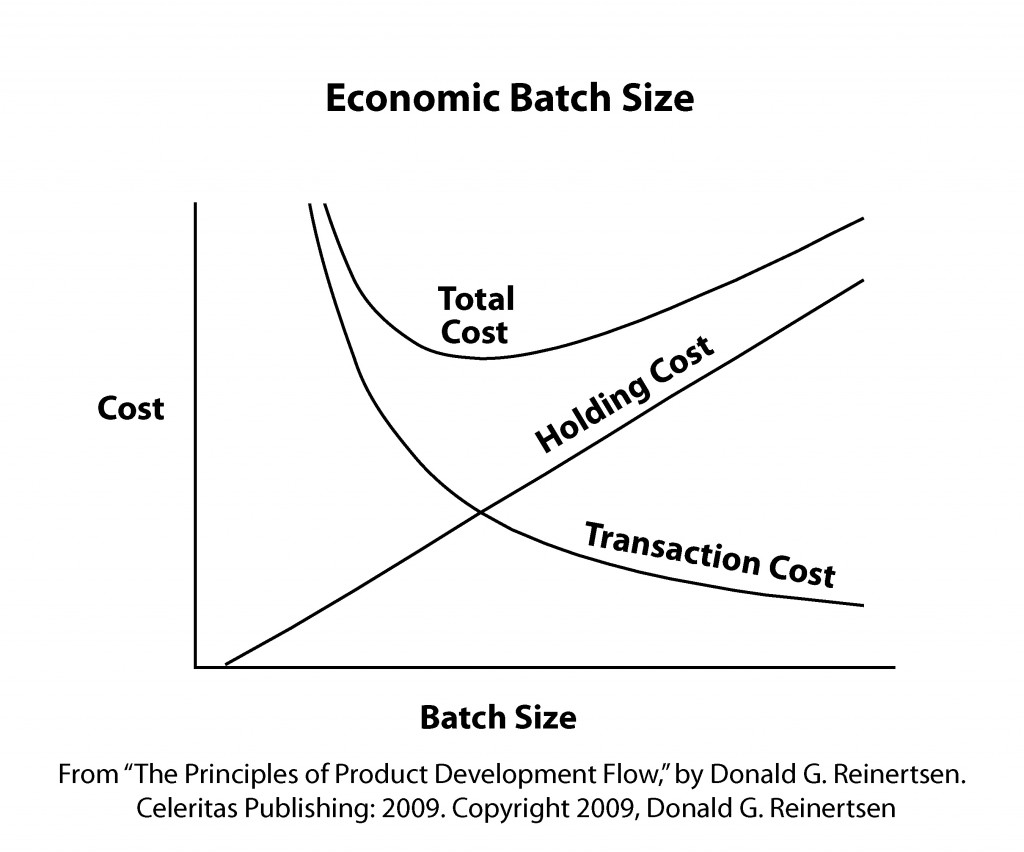
Firstly the optimal batch size is determined by the holding cost (driving smaller batch sizes) and transaction costs (driving larger batch sizes). In IT the holding costs are a combination of the increasing cost of fixing a problem later in the lifecycle and the missed benefit of functionality ready but not in production. These two factors don’t change much with DevOps. What changes are the transaction costs. Deployments, Testing efforts and migration to production are all aspects that DevOps has made cheaper through automation and through using the “minimum viable process” for governance. This means that the new batch size is much smaller than before. The relationship between DevOps maturity and batch size is something that I hope people start to appreciate more.

 “DevOps is not about making IT efficient, it’s about making business effective through IT.” – Mark Rendell

The second fantastic point that Don makes, which I want to elaborate on, is about effectiveness and efficiency in the context of quality – the smaller batch sizes at fast speed might cause more defects, but these are fixed faster and the learning from it leads to a better overall outcome. As I said in many other places defects are not a bad thing as long as you find them as early as possible and use them to learn. Driving down defects is not an outcome its a side effect of better DevOps practices. With the words of a colleague of mine: “DevOps is not about making IT efficient, it’s about making business effective through IT.”

The second publication that filled me with optimism that we can bury the factory analogy soon is Gary Gruver’s “Leading the Transformation” (http://itrevolution.com/books/leading-the-transformation/ ). He also calls out that executives have to accept the fundamental difference in complexity between IT work and manufacturing. Assuming that you can plan up-front and manage IT with the same tools as manufacturing leads to inappropriate behaviors. Especially his guidance on embarking on DevOps transformations is very valuable and provides a realistic experience.

“Executives need to understand that managing software and the planning process in the same way that they manage everything else in their organization is not the most effective approach. (…) First, each new software project is new and unique, so there is a higher degree of uncertainty in the planning.” – Gary Gruver

After reading Don’s article and Gary’s book – can any executive still argue that the principles of manufacturing still applies? Do we need more evidence? Cultural change is hard and takes a long time. But hopefully the IT industry will soon be filled with application studios full of skilled, creative and motivated knowledge workers and not with factories where each developer and tester is just a cog in the machine…thank you Don and Gary for putting a satisfied smile on my face while reading your publications. I have the torch in my hands and you have given me fire – lets burn those factories down… (in a figurative sense of course)

Picture: Hawaii – by Dan Tentler (Creative Commons License)