Agile Governance – A short overview

I recently ran a seminar on Agile governance, so what does this even mean? Agile governance requires you to find the right balance between the complete chaos of no governance at all and the smothering of all Agile benefits in overbearing governance. In this article I want to provide an overview on Agile governance across a few levels: Transformation, Program, Project and team level. There is a lot more to be said than I can put into this post, so expect me to come back to this over time.

Agile Transformation governance

To borrow from Lord of the Rings “One does not simply transform an organisation to Agile”. At the transformation level it is important to provide support for teams as they encounter challenges for adopting Agile. Some problems can proactively be addressed like training, coaching and enable good engineering/DevOps practices. Others will be uncovered as you start down the adoption path. Those blockers can be identified from the retrospectives at the team level as well as by speaking to Iteration managers and coaches. These blockers should be prioritised and provide the transformation backlog to address at organisational level. I find the below transformation governance structure very helpful as a starting point:

agile governance


Agile governance at the program/project level

I have shared my view on how to manage at the program level before here. Just one additional word of warning: Do not try to compare teams against each other for performance measurements, even under the guise of gamification this really can only lead you to bad development patterns. There are teams where this works and where their leaderships does not use the information for the wrong reasons, but the risks are higher than the benefits. Defining the success criteria for each team individually is a much better way to deal with this.

Agile governance at the team level

At the team level the SCRUM methodology provides a set of useful governance elements which you should leverage, adopt and adapt:

  • Sprint Reviews
  • Sprint Planning
  • Retrospectives
  • Team based estimations

Additionally you can use Agile maturity models and Agile metrics for teams to evaluate themselves and their progress in maturing their Agile practices.  Good coaches can help teams in this evaluation without being judgmental.

A comment on measuring individual productivity:
How do you measure the productivity of team members in your Agile teams? The short answer is YOU DON’T. I have talked about productivity in this post and if you don’t believe me perhaps Dilbert can help you understand how poisonous this idea is for your teams:

dilbert2


I am looking forward to hear from the community what you use to govern your Agile adoption across the different levels.

Is there such a thing as Hybrid Agile?

I recently wrote an article about Hybrid Agile for InfoQ  because the term has been misused too often. Feel free to read the whole article. Here is my conclusion from the article:

After many discussions, people convinced me that “Hybrid-Agile” is what is otherwise called Water-Scrum-Fall and after some deliberation I admit that this makes sense to me. Of course the term Water-Scrum-Fall or similar phrases are often used with contempt or smiled upon, but when you look closer, this is reality in many places and for good reasons.

Managing the Plethora of DevOps tools

I have been thinking about DevOps tools a lot and discussions about tools often distract from the real problems. But what are the right DevOps tools. Well I will not go into specific tools, instead I will tell what I am looking for in DevOps tools beyond the functionality they provide. In my experience you can build good DevOps tools chains with just about any tool, but some tools might take more effort to integrate than others. I will also provide some guidance on how to manage tools at the enterprise level.

It seems that new DevOps tools appear on the market every month. This is extenuated by the fact that it is difficult to classify all the tools in the DevOps toolbox. One of the best reference guides is the xebialabs periodic table of DevOps tools (https://xebialabs.com/periodic-table-of-devops-tools/ ) which is well worth checking out.

Before I go into the details of what characteristics a good DevOps tool should have, I want to address one other aspect: Should you have one tool or many in the organization?

In general, in large organization it makes sense to have a minimal set of tools to support for several reasons:

  • Optimise license cost
  • Leveraging skills across the organization
  • Minimising complexity of integration

Yet on the other side some tools are much better for specific contexts than others (e.g. your .NET tooling might be very different to your mainframe tooling). And then there are new tools coming out all the time. So how do you deal with this? Here is my preferred approach:

  • Start with small set of standard tools in your organization
  • Allow a certain percentage of teams to diverge from the standard for a period of time (3-6 months perhaps)
  • At the end of the “trial-period’ gather the evidence and decide what to do with the tool in discussion
    • Replace the current standard tool
    • Get it added as an additional tool for specific contexts
    • Discard the tool and the team transitions back to the standard tool

Obviously DevOps tools should support DevOps practices and promote the right culture. This means the tools should not be a “fenced garden” and only work within their own ecosystem. It is very unlikely anyway that a company uses only tools from one vendor or ecosystem. Hence the most important quality of tools is the ability to integrate it with other tools (and yes possibly be able to replace it which is important in such a fast moving market.)

  1. So then the first check is how well APIs are supported. Can you trigger all functionality that is available through the UI via an API (command line or programming language based)?
  2. We should treat our tools just like any other application in the organization, which means we want to version control it. The second check is hence whether all configuration of the tool can be version controlled in an externalised configuration file (not just in the application itself)?
  3. Related to the second point is the functionality to be able to support multiple environments for the tool ( e.g. Dev vs Prod). How easy is it promote configuration? How can you merge configuration of different environments (code lines)?
  4. We want everyone in the company to be able to use the same tool. This has implications for the license model that is appropriate. Of course open source works for us in this case, but what about commercial tools? They are not necessarily bad. What is important is that they don’t discourage usage. For example tools that require agents should not price for every agent as this means people will be tempted to not use it everywhere. Negotiate an enterprise wide license or ‘buckets of agents’ so that not each usage will require a business case.
  5. Visualization and analytics are important aspects of every DevOps toolchain. To make this work we need easy access to the underlying data and that means we likely want to export data or query data. If your data is stored in an obscure data model or you have no way to access the underlying data and export it for analysis and visualization then you will require additional overhead to get good data. Dashboards and reports within the tool are no replacement as you likely want to aggregate and analyse across tools.

I hope these criteria are all relatively clear. What is surprising is how few tools adhere to these. I hope tool vendors will start to realize that if they want to provide DevOps tools they need to adhere to the cultural values of DevOps to be accepted in the community.

Hopefully the tools you are using are adhering to many of these points. Let me know what you think in the comments section of this blogpost. I am very curious to learn how you perceive DevOps tools.

Thoughts on the 10th State of Agile Survey

adopt

10th Agile reportJust recently I reviewed the 9th Agile survey (read about it here) and already the 10th version is out (you can access the survey here), so I thought I provide an update. Given the results are not that different from the previous year, I will write this post a bit different. I will review some of the key results and then will provide in a second section some critical thoughts on the survey.

Part 1 – Review of the Results

Our delivery world is complex (multi-modal, distributed and outsourced)

Looking at the results about company experience, 53% say that less than half of the teams in the organisation uses Agile, only 9% say that everyone is doing Agile. So clearly we live in multi-modal world. 82% are working with distributed teams, which is larger than I expected but reflects the largely distributed nature of IT projects these days. And nearly 70% use outsourcing for their development projects. This complex environment is normal. I find it interesting how many clients tell me there are “special” because of these characteristics, they clearly are not.

What are typical benefits of Agile?

The report highlights the following three to be the top answers (which have been the same last year):
– Ability to manage changing priorities
– Team productivity
– Project visibility

This sits well with me as the usual suspects that we have to debunk are not in this list, e.g. faster time to market (only on rank 6) and cheaper delivery (not in the list at all).

How do you measure the success of Agile?

The answers to this are also stable:
– On-time delivery
– Product Quality
– Customer Satisfaction
Good answers, I think this reflects well what success looks like. I guess these are somehow measurable and provide some success measure for Agile.

How do you scale Agile?

We see a significant jump for SAFe here from 19% to 27% and I am not surprised. It certainly has a lot of momentum in the industry and provides practical guidance that I leverage in my daily work. Other frameworks are really not present (DAD, LESS,…) and have less than 10%.

Of the top 5 tips for Scaling Agile at least two are in my top lessons learned too: Consistent process & practices and Implementation of a common tool across teams. I agree with the other 3 tips as well: Executive Sponsorship, getting help from someone with experience like an Agile consultant and creating an internal support team.

What tools do you use?

Really not much movement here. The previous favourites remain on top: Jira, VersionOne, and TFS.

What makes Agile fail?

Culture has been called out as main reason this year. And it is hard to argue with this. That however is difficult to address directly. The other information is easier to address: lack of experience is the second main reason Agile fails, this means that we should make sure experienced Scrum Masters and coaches support new projects. Lack of management support and lack of support for the cultural shift are next, something we need to work on as an industry. And then a very much addressable one still gets 38% of the votes: Inconsistent agile practices and processes. This we need to fix, I don’t understand how so many people still allow Agile projects to fail because they think Agile is a freeform exercise. At the end of the day there is a project/outcome to be delivered and too many coaches still shy away from that accountability. If you work with Agile coaches make sure they have skin in the game so that they balance learning with delivery responsibility.

Overall I like the results in the report and it is consistent with the previous year which is good to see.

Part 2 – A more critical look at the survey

I like the results of the survey and got some interesting insights, but how valid is the survey? Do I understand the mechanics behind it well enough to use the data?

Let’s look at a few pieces of information that should make us think about the data before blindly quoting it:

  • First of all – who is the sample audience? Clearly the people responding to this have somehow heard about Agile as it is unlikely that others respond to an Agile survey. The people who respond are self-nominating, so they might be more on the extreme ends and feel they have something to contribute. It is not a random sample of people working in IT. This then influence the data to some degree I would think.
  • 1% said that Agile adoption has failed in their organisation. That number seems very low and might be because those people where it has failed are not responding, or it could be because the definition of failing is actually quite difficult to understand. Does failing mean you are completely going back to Waterfall or because you had mostly bad results from Agile. Not sure what my definition would be, so perhaps the lack of definition causes people to not use this value in the survey.
  • Agile techniques used – Now here I really start to struggle with the values and figuring out how this information should help me. Do only people respond to this who use Agile or everyone (even those using Waterfall)? Daily Stand-ups and prioritised backlog seem pretty fundamental to me and other than in rare cases I would expect Agile projects to use these. The numbers seem low on that basis. But wait it gets much worse, only 54% do iteration reviews/showcases, only 45% have devs and testers in the same team. I would argue that if you don’t have those two you are not really Agile – I defined Agile in another blog post as “ONE team delivery an INCREMENT of a product (at least product tested) within ONE iteration”. The problem here is that one cannot relate the info back to the methodology used and hence it becomes difficult to derive insight from this data.
  • Success measures – Velocity is the largest one. I was hoping we got over the velocity race, but clearly it’s still on. The success measures are very contextual and I would caution anyone to use this without thinking. Take for example “Planned vs. Actual stories” – it could be very positive to deliver more stories than planned or even less stories (as long as the most value is delivered). Context is unfortunately king for metrics, so don’t use the information from this survey blindly.

Thoughts on the 9th State of Agile Survey

State of Agile 9The 9th Annual State of Agile report had some confirming and some surprising results. If you have not read it, it is worthwhile having a look here. And yes I know that number 10 is soon coming out, but hey there is still value in the 9th one to look at. Besides the usual statistics around how much Agile people are doing ( key number for me was only 5% working for fully traditional organisations), it provided some interesting answers to some of the more common questions that I hear and the answers are often not surprising but there was the odd surprise. Let’s jump in:

What are typical benefits of Agile?

The report highlights the following three to be the top answers (which have been stable over the last few years):
– Ability to manage changing priorities
– Team productivity
– Project visibility

This sits well with me as the usual suspects that we have to debunk are not in this list, e.g. faster time to market (only on rank 7) and cheaper delivery (not in the list at all).

How do you measure the success of Agile?

Uhhh, tricky one this one. I have heard the question many times and honestly have struggled to give an answer that satisfies senior stakeholders. So what did the report say:
– On-time delivery
– Product Quality
– Customer Satisfaction

Good answers, I think this reflects well what success looks like. Interesting that some of the items mentioned under top benefits are showing up much lower here: Managing priorities obviously speaks to the product quality and customer satisfaction. But team productivity (29% measure it) and visibility (30% measure it) are much lower on the list. An open question for me is how people would measure productivity in the first place (see my other blog on this).

How do you scale Agile?

As much as I come across SAFe it is only used by 19% of the respondents with all the other ones even lower (DAD, LESS). The largest proportion just uses Scrum of Scrums or some custom created method.

Of the top 5 tips for Scaling Agile at least two are in my top lessons learned too: Consistent process & practices and Implementation of a common tool across teams. I agree with the other 3 tips as well: Executive Sponsorship, having a coach and creating an internal support team.

What tools and practices do you use?

Wow – I was surprised, but perhaps I should not have been that Excel and Project are the most used tools…seriously, are we not better than that??? Oh well on the real Agile tools, Jira and VersionOne takes the cake, with TFS close behind. IBM is much much lower. This represents my position as well, JIRA is certainly the one most used and few people complain about it, especially when integrated with Confluence.

There is also information on the practices uses and I was shocked to see that only 69% use retrospectives and 48% have a dedicated product owner. Overall the adoption rates of the practices feels very low, perhaps there is some fundamental flaw in the data if it considers people who run Waterfall projects but use a select few Agile practices…hmmm….

What makes Agile fail?

Good information here as well, lack of experience is the main reason Agile fails, this means that we should make sure experienced Scrum Masters and coaches support new projects. Lack of management support and a non-aligned company culture are the other two main reasons Agile fails. Those are a bit more difficult to tackle but are important to be aware of as you set off on an Agile project.

Overall I like the results in the report and it certainly helps to see some market data validating points that I keep making with my clients.

Thoughts on the State of DevOps 2015 report

state of devops front

So I have been re-reading the state of DevOps report (https://puppetlabs.com/2015-devops-report ) recently on the plane to my project and found a few interesting aspects that are worth highlighting – especially as they are matching my experience as well. It shows a much more balanced view than the more common unicorn-approach to DevOps.

First of all – I am glad that the important of deployments is highlighted. To me this is the core practice of DevOps, without reliable and fast deployments all the other practices are not effective, whether that is Test Automation or Environment provisioning. So this part from the report clearly is one of my favourites:

Deployment pain can tell you a lot about your IT performance. Do you want to know how your team is doing? All you have to do is ask one simple question: “How painful are deployments?” We found that where code deployments are most painful, you’ll find the poorest IT performance, organizational performance and culture.” – Page 5

And there is a whole page discussing this aspect on page 26, but here the summary steps to take:

  • Do smaller deployments more frequently (i.e., decrease batch sizes).
  • Automate more of the deployment steps.
  • Treat your infrastructure as code, using a standard configuration management tool.
  • Implement version control for all production artifacts.
  • Implement automated testing for code and environments.
  • Create common build mechanisms to build dev, test and production environments.

And even the speed to market with around 50% having more than a month of lead time to production feels about right (Page 11)

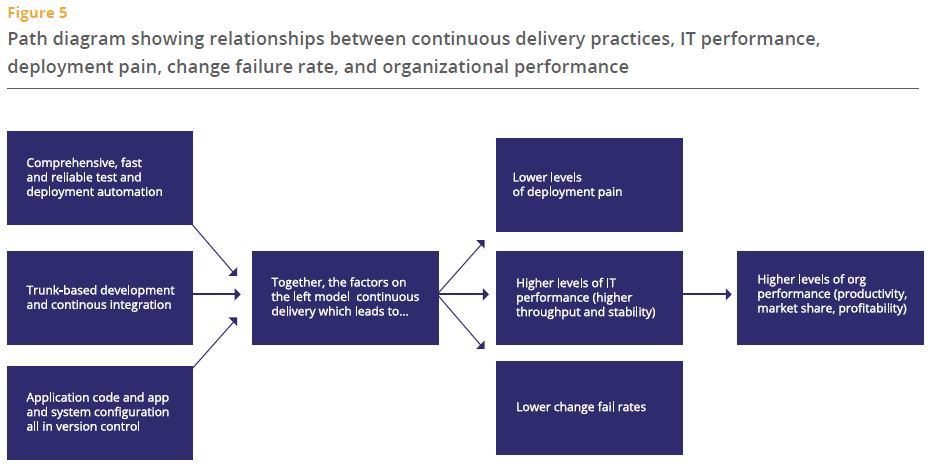
The two models on page 14 and 15 are quite good, there is not much new in this, but the choice of elements I think speaks to changes in the DevOps discussion that I have seen over the last 18 months and which I see on my projects too – and it highlights visualisation of data as one key ingredient. It’s such an important one, yet the one that not many spend their energy (and money) on. Probably because there is no obvious and easy tool choice (CapitalOne for example developed their own custom dashboard – https://github.com/capitalone/Hygieia & http://thenewstack.io/capital-one-out-to-display-its-geekdom-with-open-source-devops-dashboard/ ). The report goes on to advice “Turn data into actionable, visible information that provides teams with feedback on key quality, performance, and productivity metrics” – Amen.

Here are the two models from the report:

Model 1Model 2

And of course based on my recent discussion about DevOps for Systems of Record (Link here) I was glad to see the following statement in the report:

 “It doesn’t matter if your apps are greenfield, brownfield or legacy — as long as they are architected with testability and deployability in mind, high performance is achievable. We were surprised to find that the type of system — whether it was a system of engagement or a system of record, packaged or custom, legacy or greenfield — is not significant. Continuous delivery can be applied to any system, provided it is architected correctly.” – Page 5

Overall I think this report is really useful and represents what I see in my projects and at my clients very well. It also discusses the kind of investments required to really move forward (page 25) and provides guidance on many aspects of the DevOps journey. I am looking forward to see what the next year will bring.

Microservices 101 – What I have learned so far

lego-252602_960_720It is kind of difficult to walk the DevOps circles without hearing the word Microservices being mentioned again and again. I have sat through a bunch of conference talks about the topic and only recently came across a couple that were practical enough that I took things away from that have applicability in my normal project work. The below is heavily influenced by the talks at this year’s YOW conference and the talks at the DevOps Enterprise summit of the last two years.

What are Microservices?

Microservices are the other extreme of monolithic applications. So far, so obvious. But what does this mean. Monolithic applications look nice and neat from the outside, they behave very well in architecture diagrams as they are placeholders for “magic happens here” and some of the complexity is absorbed into that “black box”. I have seen enough Siebel and some SAP code that tells me that this perceived simplicity is just hidden complexity. Microservices make the complexity more visible. As far as catchy quotes go, I like Randy Shoup’s from YOW15: “Microservices are nothing more than SOA done properly.” Within this lies most of the definition of a good Microservice: It is a service (application) that is for one purpose, it is self-contained and independent, has a clearly defined interface and isolated persistence (even to the point of having a database per service).

An Analogy to help:

“This, milord, is my family’s axe. We have owned it for almost nine hundred years, see. Of course, sometimes it needed a new blade. And sometimes it has required a new handle, new designs on the metalwork, a little refreshing of the ornamentation . . . but is this not the nine hundred-year-old axe of my family? And because it has changed gently over time, it is still a pretty good axe, y’know. Pretty good.”

This is what Microservices do to your architecture…

What are the benefits of Microservices?

Over time everyone in IT has learned that there is no “end-state architecture”. The architecture of your systems always evolves and as soon as one implementation finishes people are already thinking about the next change. In the past the iterations of the architecture have been quite difficult to achieve as you had to replace large systems. With microservice you create an architecture ecosystem that allows you to change small components all the time and avoid big-bang migrations. This flexibility means you are much faster in evolving your architecture. Additionally the structure of Microservices means that teams have a larger level of control over their service and this ownership will likely see your teams become more productive and responsible while developing your services. The deployment architecture and release mechanism becomes significantly easier as you don’t have to worry about dependencies that need to be reflected in the release and deployment of the services. This of course comes with increased complexity in testing as you have many possible permutations of services to deal with, so automation and intelligent testing strategies are very important.

When should you use Microservices?

In my view Microservices are relevant in areas that you know your company will invest in over time. Areas where speed to market is especially important are a good starting point as speed is one of the key benefits of Microservice where dependency-ridden architecture get bogged down. This is due to many reasons from developers having to learn about all the dependencies of their code to the increasing risk of component to be delayed in the release cycle. Microservice wont have those issues. Another area to look for is applications that cannot scale vertical much longer in an economic fashion, the horizontal scaling abilities of microservices specific to those services increases the possibilities to find economic scaling models. And of course a move towards Microservices requires investment, so go for an area that can afford the investment and where the challenges mentioned above are providing the burning platform to start your journey.

What does it take to be successful with Microservices?

This will not surprise you, but the level of extra complexity that comes with independently deployable services which then also might exist in production in multiple versions, means you need to really know your stuff. And by this I mean you need to be mature in your engineering practices, have a well oiled deployment pipeline with “Automated Everything” (Continuous Integration, Deployment, Testing). Otherwise the effort and complexity in trying to maintain this manually will quickly outweigh the benefits of Microservices. Conway’s Law says that systems resemble the organisational structure they were build in. To build Microservices we hence need to have mastered the Agile and DevOps principle of Cross-Functional teams (and ideally they are aligned to your value streams). These teams have full ownership of the Microservices they create (from cradle to grave). This makes sense if the services are small and self-contained as having multiple teams (DBAs, .NET developers,…) involved would just add overhead to small services. As you can see my view is that Microservices are the next step of maturity from DevOps and Agile as they require organisations to have already mastered those (or being close to at least).

How can you get started?

If your organisation is ready (which similarly to Agile and DevOps is a prerequisite for the adoption of Microservices) go ahead and choose a pilot and create a Microservice that adheres to the definition above and is of real business value (e.g. something that is being used a lot, is customer facing and is in a suitable technology stack). Your first pilot is likely not going to be a runaway success, but you will learn from the experience. Microservices will require investment from the organisation and the initial value might not be clear cut (as just adding the functionality to the monolith might be cheaper initially), but in the long term the flexibility, speed and resilience of your Microservice architecture will change your IT landscape. Will you end with a pure Microservice architecture? Most likely not. But your core services might just migrate to an architecture that is build and designed to evolve and hence serve you better in the ever changing marketplace.

Now – over to you. Let me know what you have learned by using Microservices, whether you think the above is true or did you have different experiences. Looking forward to hear what the current state of play is in regards to Microservices.

Last but not least some references to good Microservices talks:

Randy Shoup https://www.youtube.com/watch?v=hAwpVXiLH9M

James Lewis https://www.youtube.com/watch?v=JEtxmsJzrnw

Jez Humble https://www.youtube.com/watch?v=_wnd-eyPoMo

Why our DevOps maturity has not improved as much as I expected 15 years ago

PrintOne thing that continues to fascinate me is how after so many years I can still walk into IT organisations and see basic practices not being followed (e.g. Software Configuration Management or Continuous Integration or …). Shouldn’t we all know better?!? I recently came across some slides from the late 90s and early 2000s that pretty much read like something that comes from a DevOps conference today. So I wonder what is it that has prevented us from being better today and I think I found a feasible answer to my question.

For illustrative purposes I have used the Accenture DevOps maturity model, but feel free to use any other model here as the tendency would be similar. I believe that as an industry we used to be better than we are today (of course all generalisations are dangerous, including this one). While it is hard to find hard evidence for this, let me try to justify my perspective.

DevOps Journey

More than 10 years ago we had much more custom development to solve the big problems and most work was done onshore in collocated teams. The only way to be more productive and reduce cost was to have better engineering practices and leverage more automation, hence companies invested in this. We used to be on the mature end of consistent in many places. Then two trends caused us to regress as far as engineering practices are concerned:

  • Offshoring – With the introduction and mastering of offshore delivery, the industry had an alternative to automation and good engineering practices as labour arbitrage was providing a quick fix to cost reduction. It was potentially cheaper to do something manually offshore than maintaining or introducing automation onshore. Of course this couldn’t last as the labour cost offshore increased steadily. Some organisations stayed the course of engineering practices and automation others lost maturity along the way. This trend is similar to the same trend in manufacturing where manual labor became so cheap that automation wasn’t a critical element to cost reduction anymore. Those companies who went offshore did not sufficiently focus on automation and good practices as it was harder to oversea this with across locations and cost reductions were easy to achieve.
  • Packaged and proprietary Software – As we leveraged more and more packaged and proprietary software we relied on those vendors to provide the solution to our productivity challenges. This led over time to island solutions, which supported specific packages, but are not open enough to integrate into the IT ecosystem. How do you baseline an enterprise wide software package when configuration management is hidden in a package or worse still configuration is only possible through a graphical user interface with no access to the underlying source code/text files? The pre-packaged software was a quick fix to get functionality, but again the good engineering practices were lost out of sight. And many organisations make so many customisations that they should really treat the original “COTS” just like any other application with the same rigor. The other problem that packaged software introduced is that the people customising them are often considered or consider themselves not to be programmers (which means they don’t have to worry about those practices that the custom application developers use), a dangerous mistake in my view.

“Speed is the new currency of IT and businesses”

This was all well and good when cost as expressed by the cost of a day of labor was the main driver for optimisation in organisations. This paradigm has shifted and nowadays speed to market is driving incentives and behaviour. Organisations across the globe are trying to find ways to speed up their delivery processes without risking quality. But how do you now revert the trend that many organisations followed – your IT organisations is mainly outsourced and/or offshored, you have an application architecture that is a mix of packaged software, proprietary solutions and custom elements and you lack the engineering experience and skills to fix it.

This is where we need to acknowledge that DevOps is a journey that is different for every organisation. Of course there are the engineering driven organisations like Etsy, Amazon and Facebook that have engineers/IT people in their C-suite of executives who intuitively understand the importance of application architecture and good engineering. I believe they won’t ask you for a business case for what is ultimate an optimisation for speed and flexibility – they understand how important good IT is – at least I believe that to be the case. They will also consider which applications to introduce into their ecosystem and making sure that those are open products for which good engineering practices can be employed. In other organisations the adoption of DevOps practices needs to be supported by business cases that are often difficult to create (especially in the middle maturity levels where the pain is not at mission-critical levels and the full benefit of highest maturity is not yet in arms reach). Organisations that are on this journey with the majority of us in the industry need to acknowledge the sometimes intangible nature of improvements. Speed to market and other cycle time measures should be the guides for your journey.

“Everyone is on the DevOps journey, whether you know it or not”

The question whether “you are doing DevOps or not” is not valid in my view. We are all on the DevOps journey, it’s the journey of improving delivery of IT solutions. DevOps is a broad field and provides us with an ever growing toolkit of practices and tools. All of us IT Executives are on the search to improve our organisations and our delivery capabilities. What label we use for that doesn’t matter as long as we keep moving forward and keep experimenting. Is there a goal to this journey? No, I don’t think there is concrete goal, a state when we declare we are done. I think the best of us will keep pushing forward no matter how good we are getting at it and from what I have seen during my travels there is still plenty of road in front of me that I can see and I don’t need to worry about getting “there” anytime soon in any case. Join me on the journey and may our paths cross to share stories of our adventures on the road.

Note: This post was first published on DevOps.com.

Have we Agilists misused the military as example of Command & Control

Washington_Crossing_the_Delaware_by_Emanuel_Leutze,_MMA-NYC,_1851 (1024x656)If you are like me you believed since early days in your life, that the military is the example for command and control. I personally have never experienced the military by myself, but frequently I heard phrases like “We are not as strict with our command and control as the military”. Only recently after hearing from Don Reinertsen and Mark Horstman about their experiences in the military did I come to question my understanding.

“No plan survives the contact with the enemy” – from Helmuth von Moltke the Elder

So in my head I had this organisation where everything is well planned and if anything I would have associated it with the “waterfall” mentality more than an “agile” mentality. But let’s look a bit closer. In any real combat situation the enemy will behave differently to what you expect and it is very unreasonable to account for all possible details in the field. The above quote from von Moltke the Elder demonstrates that. So clearly the planning in detail and then just executing the plan approach will not work in such cases. So how does the military then operate?

The military makes sure that the soldiers understand what the goal of the mission is. Planning is being done on a high level (which mountain to take or what strategic points to take) which then breaks down into more detailed plans and not just for one scenarios. When practicing some variables get changed so that the soldiers learn to improvise and replan as more information about the situation becomes available. Does this sound familiar? It sounds exactly like the behaviour of an Agile team (with the difference that Agile teams don’t get the chance to practice their projects many times before doing it for real).

What this allows is a high-speed of decision while still adhering to a high level plan. It is possible because the organisation is aligned on the goals and high level plan. Imagine soldiers always had to wait in the field until the “project plan” is updated before they can proceed with changes to the plan. That would take way too long, so they are empowered to change as required within certain well-known parameters. By pushing decisions down to the lowest level the speed of decisions improves. And with clear parameters of what they can decide and what not, the risk of these decision is adjustable. When the lower level decisions aggregate to changes to the overall plan, then there are people at this level who can make those decisions as well (the product owners and release train engineers I guess).

I certainly think differently about the military now after hearing stories and examples that show how inherently agile they have to be. It makes for a good organisational example of combining high level plans and goals with agility and how to achieve positive results.

Here is a slide from Don’s talk with a few additional points:

military

I am no expert in the military so I am looking forward to your thoughts and I will surely learn from the discussion.

How to manage 100s of emails a day without going mad

21579892786_e3d206d567_zIf you are like me, you get hundreds of emails each day and more often than not you think that you would be more productive at work without the most frequently used communication method these days. Over the years I have tuned my processes and have adopted them with functionality becoming available in Outlook (my mail client of choice). I want to share my system with the rest of the world as it works reasonably well for me and perhaps can benefit others as well.

  1. Turn off notifications

The most important thing about emails is that they should not distract from any work you are doing. So do yourself a favor and go into outlook and turn off the notifications – and I mean all notifications: The sound, the little pop-up and the tray notifications. Any of those will cause you to get curious and quickly check the email and you will be immediately distracted. Same counts for your phone, set the phone to fetch and not push, so that your phone is not alerting you to new emails constantly by vibrating in your pocket or worse making a noise. On a regular basis when you have a break between other tasks you can check on your emails and you should put regular times in your calendar to go through your emails in one batch.

  1. Use Rules to direct the traffic

The inflow of traffic in your inbox can be overwhelming, especially if you get notifications from automated systems (like production monitoring). So the next important step in my system is to setup rules that automatically direct emails into different folders. I have setup a whole long list of rules, but a few core rules are the following: Emails that you are CC’d on (because they are of lower priority), Emails from your boss(es) (because they are of higher priority), Newsletters (of lowest priority), emails from family (highest priority), system generated notifications (for reference only usually), meeting invites and responses. For each of these folders you can change the setting to see how many items are in the folder which gives you a good view of the unprocessed emails in each.

  1. Filing system

Create a filing system that makes it easy to do two things: Identify your work baskets (the emails you need to do something with) and to find emails again later (some do this in one big reference folder, others prefer a more sophisticated folder structure). I will not talk about the reference folders as personal preference prevails for those, but want to share my work baskets with you. For each folder I have set it so that I see how many items are in the folder, not just the ones marked new as each item in these folders represents a backlog item whether I have seen the email or not.

  • Unprocessed emails (which the rules from step 2 above sort for me)
    • Inbox (everything rules didn’t catch)
    • Family
    • Boss
    • Meetings
    • CC’d
    • Newsletters
    • Notifications
  • Prioritised emails:
    • Immediate (items that come up within the day and need to be responded to in less than 24 hours)
    • Today (items I planned for today)
    • Tomorrow (items I am considering for tomorrow)
    • Soon/Backlog (items that require my action but are not time critical)
    • Eventually (items that I will do when I get some time)
    • Follow-up (items that don’t require my action, but I want to keep tracking like actions someone else is meant to do)
  1. Use Quick Steps to file emails away

Outlook provides some very handy functions that allow you create short cuts called “Quick Steps”. For some of the main folders from the filing system (like the today, tomorrow, soon folders), you can create shortcuts which means with 1 click the email gets filed correctly. This speeds up the processing of emails up significantly.

Quick Steps

  1. Daily processing of emails

Now to the key three processes of dealing with emails:

  1. Cleaning out the unprocessed emails
    At least once a day, you should set time aside to go through all the unprocessed emails and process them by priority (in case you don’t get through them all). You want to clean out the folders by sorting them according to urgency. By default you want to put them into your backlog (the folder “Backlog/Soon” from earlier). If it is more urgent you put them in the folder “tomorrow” and you don’t put anything in the folder “today” for reasons I will explain below. If an email requires less than 24 hours turn around put them in the immediate folder which shows you urgent emergency emails. And of course the stuff that is not even backlog worthy goes in the “eventually” folder.
  2. Planning for the next day
    At the end of a day or in the morning of a day you go through a planning exercise. You want to go through your folders and move the items to the today folder that you want to get done within the next 24 hours. This to-do list is a closed list which you only add to during this planning session. This is what protects you from losing focus and being driven by your inbox. Once the “today” folder is empty and there is still time in the day you can go hunting for other items in your work baskets. Every day in your plan you want to go through the “tomorrow” folder at least, and then in less frequent intervals you want to cover all the other folders as well, so that you replan your overall backlog on a regular basis.
  3. Getting things done
    During the day, whenever you plan for email based work, you go through your “today” folder and get things done from that list. Remember that you should not action anything in your unprocessed folder as tempting as it might be – get the planned work done first. The only exception is the “immediate” folder that requires your attention for action.

If you follow these 3 simple steps I think you will see the burden of emails weighing less on you each day. You still pretty much have a 24 hour turn-around time for emails that are somewhat time critical but you will never feel out of control of your inbox anymore and worry about items that might be in there and are urgent and important but you failed to see them.

  1. Archiving

The last step is archiving the emails, which is only really necessary because the size of your folders does impact the performance of outlook. I go for the easiest possible way of doing this, which is by date. Every 6 months or so I create an archive and move all emails that are older than 6 months into an archive and name it after the time period. That way I can always open it up when required. Here is where having a more sophisticated reference folder structure helps as I keep all the .pst files closed until I need them. Opening up a large .pst and waiting until search is working takes too long for me, so I prefer to be able to browse through folders where I have pre-sorted my emails by topic.

Picture: You’ve got mail by Eli Christman
Under Creative Commons license